


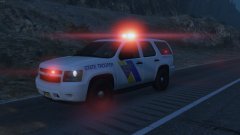


Honor, Duty, Fidelity NJSP

By Deactivated Member
- 972 views
- View Deactivated Member's images
A little work in progress to go with NJSP CVPI.
A huge thank you to iansonwheels! He's been my support, he's helped out a tremendous amount, and he has created the STUNNING skins!
Thank you so much Ian!
Also the vehicle is being worked on, ignore the obvious failures of myself. (the front pushbar lights are placed weirdly causing the lights not to shine correctly at certain angles, etc) The video shows of the amazing amount variety we can now have. With atleast 4 variants of the NJSP Tahoe. The pushbar can be spawned with working lights, the grille lights can also be spawned when needed pointing to different variants of the vehicle. And also the ability to switch between hubcap variants and steelie rim variants on the fly!
I hope you enjoy the video as well. Have a great day!
Video:
Imgur Album: http://imgur.com/a/cHEEO
Recommended Comments
Join the conversation
You can post now and register later. If you have an account, sign in now to post with your account.