
Skip to content
View in the app

A better way to browse. Learn more.

LCPDFR.com

A full-screen app on your home screen with push notifications, badges and more.

To install this app on iOS and iPadOS
  1. Tap the Share icon in Safari
  2. Scroll the menu and tap Add to Home Screen.
  3. Tap Add in the top-right corner.
To install this app on Android
  1. Tap the 3-dot menu (⋮) in the top-right corner of the browser.
  2. Tap Add to Home screen or Install app.
  3. Confirm by tapping Install.

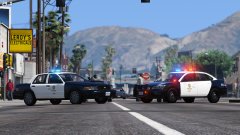
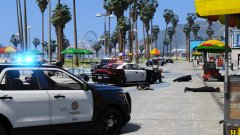
LAPD in South LA

LAPD on stand by, ready and waiting for a pursuit heading their way.


For those interested, I am using:


the 2011 LAPD Ford Crown Victoria by FCVP71

2014 Chevrolet Impala by BxBugs123

True LAPD/LASD Texture pack by Vladimir850

VisualV 1.0.110 by _CP_ & Robi29

Improved Spotlight and LED V7.0.5 by GravelRoadCop


Account

Navigation

Search

Search

Configure browser push notifications

Chrome (Android)
  1. Tap the lock icon next to the address bar.
  2. Tap Permissions → Notifications.
  3. Adjust your preference.
Chrome (Desktop)
  1. Click the padlock icon in the address bar.
  2. Select Site settings.
  3. Find Notifications and adjust your preference.