


By BroCop
- 1,711 views
- View BroCop's images
RDE 2.0: https://www.gta5-mods.com/misc/realism-dispatch-enhanced
More screenshots: https://imgur.com/a/B9c4e/layout/horizontal#0
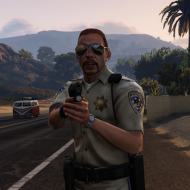
RDE: Best lore-friendly models and textures, all compatible and in one easy to install package, coupled with enhanced AI and an extended dispatch system.
Textures/Models Included:
- Coast Guard Enhancement
- Military Enhancement Project
- SAHP SWAT
- LSSD SWAT
- NOOSE SWAT (Tactical Response Unit)
- SAHP Cars
- LSPD Granger
- LSSD Interceptor
- LSSD Maverick
- SAHP Maverick
- National Guard Annihilator (unarmed)
- NOOSE Annihilator (unarmed)
- NOOSE Riot
- LSPD Detectives
- Female SAHP
- SAHP Bike Retexture
- LSSD Retexutres
- LSPD Car Retextures
- LSPD Maverick Retexture
- LSPD/LSSD Ped Retextures
- Female Park Ranger Ped Retexture
- LSPD Riot Retexture
- NOOSE SEB Cruiser/Granger
- NOOSE PIA Cruiser/Granger
- Military Replacements/Retextures: Boar (A-10), Rhino (M1A1 Abrams), Storm (F-22), and Hunter (AH-64 Apache)
Script Includes:
- 8 different vehicle response categories that decide the response at a 5 star wanted level (Can be customized in the INI)
[Water_General]
[Chopper_Heavy]
[Chopper_General]
[Tank]
[Plane_Heavy]
[Plane_General]
[Ground_Heavy]
[Ground_General]
- Juggernauts have been added to spice things up a bit. (Can also be customized in the INI)
- Working Insurgents gunners, Valk gunners, Valk cannon, Attack choppers: Savage, Hunter,
- Dog Fighting AI for Jets
- Ability to switch between Army/No Army options
Recommended Comments
Join the conversation
You can post now and register later. If you have an account, sign in now to post with your account.