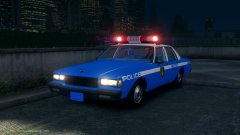
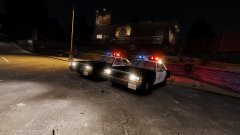
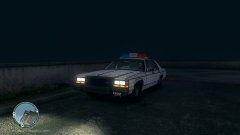
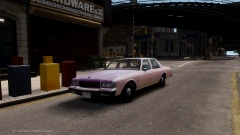
The Caprice. Share https://www.lcpdfr.com/gallery/image/50421-the-caprice/ Share on Facebook Share on X {lang="reddit_text" More sharing options... Followers LTD and Caprice ready for release. Just waiting on strike to finish the LA textures for Caprice. Credit Model: CARFACE/Edits: Me Lightbar: KevinDV/Edits:Me LAPD Textures: strike Copyright © Respective Owners
Starmix Members July 25, 201510 yr Author stats @Lundy! This looks amazing, very happy that people are still putting effort into GTA IV.
Deactivated Member Deactivated July 25, 201510 yr Author stats Good enough reason for me to re-download IV.
LilQ Members July 25, 201510 yr Author stats Awesome looking! Though that LTD looks as if the rear suspension is damaged. This, if you let me call it "glitch", was present since the very first release by Carface. Unfortuantely, it wasn't fixed by anyone yet...
Sameer Members July 25, 201510 yr Author stats Awesome looking! Though that LTD looks as if the rear suspension is damaged. This, if you let me call it "glitch", was present since the very first release by Carface. Unfortuantely, it wasn't fixed by anyone yet...Yes I know mate. I tried a lot of ways,even tired changing the mass but nothing has helped yet. I am still working on it though, trying to find a way around before the final release.
LilQ Members July 26, 201510 yr Author stats Yes I know mate. I tried a lot of ways,even tired changing the mass but nothing has helped yet. I am still working on it though, trying to find a way around before the final release. This might be an obvious suggestion but, maybe you should seek for help of other modders? :) Forums maybe? Keep the good work up! Nice to see these "boxy" old school stuff *thumbs up*









Recommended Comments
Join the conversation
You can post now and register later. If you have an account, sign in now to post with your account.