Skip to content
View in the app

A better way to browse. Learn more.

LCPDFR.com

A full-screen app on your home screen with push notifications, badges and more.

To install this app on iOS and iPadOS
  1. Tap the Share icon in Safari
  2. Scroll the menu and tap Add to Home Screen.
  3. Tap Add in the top-right corner.
To install this app on Android
  1. Tap the 3-dot menu (⋮) in the top-right corner of the browser.
  2. Tap Add to Home screen or Install app.
  3. Confirm by tapping Install.

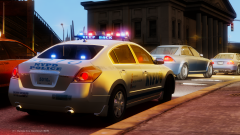
NYPD Altima RMP (ELSv8)

After seeing that SkylineGTRFreak released his Altima model unlocked today, I had to jump on the opportunity to try my hand at making an accurate, ELSv8 compatible version of one of my hometown's RMP's. Light patterns are as realistic as can be with ELSv8. Has working multi-stage lighting, accurate to NYPD standards, with more features planned.

From the album:

Miscellaneous

· 32 images

Account

Navigation

Search

Search

Configure browser push notifications

Chrome (Android)
  1. Tap the lock icon next to the address bar.
  2. Tap Permissions → Notifications.
  3. Adjust your preference.
Chrome (Desktop)
  1. Click the padlock icon in the address bar.
  2. Select Site settings.
  3. Find Notifications and adjust your preference.