Due to overzealous filtering on Microsoft’s side, some emails to Outlook and Hotmail addresses may not be delivered. If you’re affected, please use a different email address or try again later.
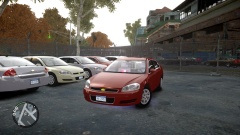
LCPD Special Operations-Traffic Division just received a new order of Unmarked Chevrolet Impala's. After several petitions from officers against the new ELS vehicles having to many bugs and crashes, the LCPD has offiicially decided to reinstate Non ELS models.




Recommended Comments
Join the conversation
You can post now and register later. If you have an account, sign in now to post with your account.