





"My First Shift"

By DukSezQuak
- 789 views
- View DukSezQuak's images
Officer 2 Martin Jackson of the Silverlake Police joined in May of 2003 and has been one of Silverlakes Finest since then. As a part of our Archives Sharing program, he chose to share his story and a couple of pictures of his career.
It was a rainy first shift in November of 2003. Silverlake, being humid and around lots of water doesn't generally see snow in the winter months, so rain was the norm.
"I will always remember that shift. Was quite eventful if I may say so myself" Officer 2 Jackson said.
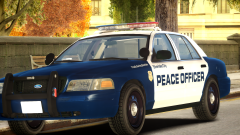
"This image holds a special place in my heart, as it was the first day I got to serve my community." "I've come a long way since then."
This image was taken when OFC 2 Jackson was assigned to the Silverlake Mountain Division. He policed there for 6 years before he came to Central Division.
Officer 2 Jackson is a fictional name and is used for the roleplay purposed of Silverlake City. Any reference to a real individual is purely coincidental and is NOT intended.
Recommended Comments
Join the conversation
You can post now and register later. If you have an account, sign in now to post with your account.