


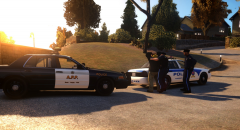








Burgluary in progress.

By Crizby
- 742 views
- View Crizby's images
Today at 01:16 PM the Broker-Dukes Metropolitan Police Department responded to a burglary in progress call. After a short stand off lasting no longer than a minute or two the two suspected burglars surrendered.
They are both known repeat offenders on probation for previous burglaries.
If you have any tips or reports, please contact the Broker-Dukes Metro Crime Stoppers at; 1-800-555-TIPS (8477) or visit www.BDMPD.org/tips
Sidenote; I can finally take screenshots with Steam again, which feels great. It's so much higher quality than Fraps and take up less space on the computer.
Also, I'm not responsible for whatever may happen if you actually try to call the number or visit the website listed above...
Recommended Comments
Join the conversation
You can post now and register later. If you have an account, sign in now to post with your account.