


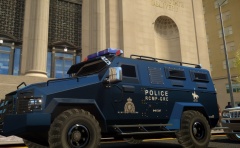


updating my rcmp skins

By Lazerus
- 558 views
- View Lazerus's images
Hey guys/gals, been sometime since I've done anything on here, but anyways cutting to the chase. Starting to get back into the mood of things and just started reworking my rcmp skins atm. Doing some much needed touch ups I've been neglecting to do.. so here is some updates.
-reworked the white on the banner, to a more "grey" color to stand it out more, more realistic
-adding in an integrated road safety unit skin now
-fixing up the rear bumper design.. again more realistic.. might be looking to fix up the crime stoppers image too.
also been just going over things touching them up on all my skins, from Tahoe/explorer/cvi/Taurus/ and also doing up a rcmp ERT skin for a certain new armored truck recently released. *stay tuned for pics*
Recommended Comments
Join the conversation
You can post now and register later. If you have an account, sign in now to post with your account.