


![Ford Explorer Utility [wip]](http://s3-gallery.int-cdn.lcpdfrusercontent.com/gallery/album_2124/sml_gallery_45963_2124_634365.png)
![skin request [WIP]](http://s3-gallery.int-cdn.lcpdfrusercontent.com/gallery/album_2124/sml_gallery_45963_2124_197840.jpg)
![skin request [WIP]](http://s3-gallery.int-cdn.lcpdfrusercontent.com/gallery/album_2124/sml_gallery_45963_2124_162514.jpg)


![Tomar Blade [WIP]](http://s3-gallery.int-cdn.lcpdfrusercontent.com/gallery/album_2124/sml_gallery_45963_2124_35200.png)
Liberty CIty's Newest Fleet Member
By GTAxB0SS
- 950 views
- View GTAxB0SS's images

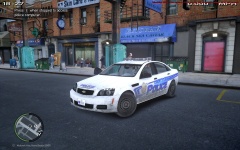
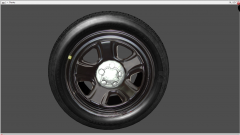
New update on the Caprice and the base poly count is 40k, yes, that is right! since i have not done much with this lightbar figured it would be nice on this car! A huge thanks to Heisenberg for helping with with the project by making the 3-D headlights, taillights, and rims! This project was mainly to crunch the crap out of the polys, and the results are in.
- Start - 67914
- Finish - 40510
Copyright
© Code3Customz2014
Recommended Comments
Join the conversation
You can post now and register later. If you have an account, sign in now to post with your account.