Skip to content
View in the app

A better way to browse. Learn more.

LCPDFR.com

A full-screen app on your home screen with push notifications, badges and more.

To install this app on iOS and iPadOS
  1. Tap the Share icon in Safari
  2. Scroll the menu and tap Add to Home Screen.
  3. Tap Add in the top-right corner.
To install this app on Android
  1. Tap the 3-dot menu (⋮) in the top-right corner of the browser.
  2. Tap Add to Home screen or Install app.
  3. Confirm by tapping Install.

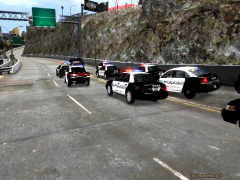
Police Chase Robbery Suspect, Ends in Crash

On February 11, 2012, a suspect ran from LCPD officers before crashing on the Algonquin-Dukes Expressway. The pursuit started at 11:30 near Star Junction before the suspect crossed the Colony Island Bridge. This pursuit crossed through two precints before the suspect crashed into a road sign. We have witnesses that tell us the suspect was seen robbing a convenience store, but when officers arrived, he opened fire on them. We will be continuing to publish more details as they come out.

  • From the album:

    Random Stuff

    · 19 images

    Account

    Navigation

    Search

    Search

    Configure browser push notifications

    Chrome (Android)
    1. Tap the lock icon next to the address bar.
    2. Tap Permissions → Notifications.
    3. Adjust your preference.
    Chrome (Desktop)
    1. Click the padlock icon in the address bar.
    2. Select Site settings.
    3. Find Notifications and adjust your preference.