Skip to content
View in the app

A better way to browse. Learn more.

LCPDFR.com

A full-screen app on your home screen with push notifications, badges and more.

To install this app on iOS and iPadOS
  1. Tap the Share icon in Safari
  2. Scroll the menu and tap Add to Home Screen.
  3. Tap Add in the top-right corner.
To install this app on Android
  1. Tap the 3-dot menu (⋮) in the top-right corner of the browser.
  2. Tap Add to Home screen or Install app.
  3. Confirm by tapping Install.

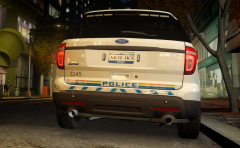
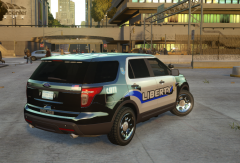
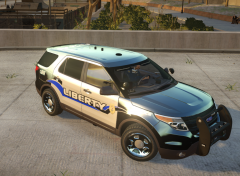
1st RCMP design, back end shot

I wanted to put the "Police" decal up where it should, but due to having the ford logo there. So looked at some RCMP Tahoe designs, which did have the "Police" and related decals on the bottom of the rear door. So when with that. Also added reflective material on the bumper caution decal. Not that rcmp have that on theirs but, I thought it give it some character to it.

  • From the album:

    My screens/publications/ect

    · 117 images

    Account

    Navigation

    Search

    Search

    Configure browser push notifications

    Chrome (Android)
    1. Tap the lock icon next to the address bar.
    2. Tap Permissions → Notifications.
    3. Adjust your preference.
    Chrome (Desktop)
    1. Click the padlock icon in the address bar.
    2. Select Site settings.
    3. Find Notifications and adjust your preference.