Skip to content
View in the app

A better way to browse. Learn more.

LCPDFR.com

A full-screen app on your home screen with push notifications, badges and more.

To install this app on iOS and iPadOS
  1. Tap the Share icon in Safari
  2. Scroll the menu and tap Add to Home Screen.
  3. Tap Add in the top-right corner.
To install this app on Android
  1. Tap the 3-dot menu (⋮) in the top-right corner of the browser.
  2. Tap Add to Home screen or Install app.
  3. Confirm by tapping Install.

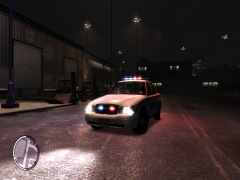
EFLC 2013 11 17 18 09 09 320

As part of a Federal & Regional Policing Unit across Liberty City the Canadian Military Police, RCMP & Halifax Regional Police release 6 2011 Police Units unique to their original specs into the streets of LC complete with Tomar Blade Light bars, Grill Lights, Headlight Strobes, Tailight Strobes & LEDs in the back windows for extra support with Gang & Terrorism within the City's limits... Each Police Agency is entitled to 2 cruisers each.

  • From the album:

    A day in the life....

    · 76 images

    Account

    Navigation

    Search

    Search

    Configure browser push notifications

    Chrome (Android)
    1. Tap the lock icon next to the address bar.
    2. Tap Permissions → Notifications.
    3. Adjust your preference.
    Chrome (Desktop)
    1. Click the padlock icon in the address bar.
    2. Select Site settings.
    3. Find Notifications and adjust your preference.