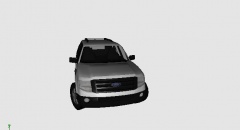
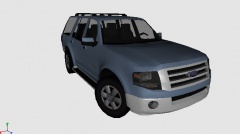
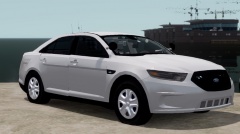
2010 Expedition Share https://www.lcpdfr.com/gallery/image/22898-2010-expedition/ Share on Facebook Share on X {lang="reddit_text" More sharing options... Followers It Aint that Pretty But I can Make it look Pretty.. (SELF CONVERTED) will have 3D Taillights.. Redone Interior and some upgraded exterior Parts What do you think! but keep in mind before you start hating on it.. its a WIP and its from Google SketchUp (Same Model Dhruv Has) EDIT:
Caesar Members October 12, 201313 yr Author stats Looks great! When its completed...I have a perfect project for it! PM when your done with it (completely).
Piarulli246 Members October 12, 201313 yr Author stats Good luck man! I bet it will come out good when its finished.
XBR410 Members October 12, 201313 yr Author stats do you guys think I should continue on with this? I know a lot of people think it looks pretty ugly right now the interior and the tail lights are my only ideas haha
EFox Members October 12, 201313 yr Author stats Yeah, definitely keep going. I'd love to see projects with this. Even if it doesn't work great, it's worth a shot.
XBR410 Members October 12, 201313 yr Author stats the overall exterior of the vehicle looks okay except the back can get worked on.. nothing sems to be too wrong with the front but the interior is terrible
Sgt.Kanyo Members October 12, 201313 yr Author stats That model looks really bad, I don't know why you even bother. You could achieve a lot better result by redoing the whole car or just choosing a model you like from here: http://gamemodels.ru/
XBR410 Members October 12, 201313 yr Author stats That model looks really bad, I don't know why you even bother. You could achieve a lot better result by redoing the whole car or just choosing a model you like from here: http://gamemodels.ru/ if you don't like it don't download it. I Think it looks just fine, and I know there are people who agree.
Him1250 Members October 12, 201313 yr Author stats Remember, GTA IV is a 3rd person shooter game. Not a 1st person.
RoegonTV Members October 15, 201313 yr Author stats That model looks really bad, I don't know why you even bother. You could achieve a lot better result by redoing the whole car or just choosing a model you like from here: http://gamemodels.ru/ Were it possibel to bitch slap someone across the internet, I would bitch slap you across the internet. Be nice.


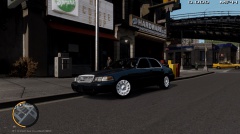
![2012 Charger (XBR410) [WIP]](http://s3-gallery.int-cdn.lcpdfrusercontent.com/gallery/album_1963/sml_gallery_37637_1963_435755.png)




Recommended Comments
Join the conversation
You can post now and register later. If you have an account, sign in now to post with your account.