Skip to content
View in the app

A better way to browse. Learn more.

LCPDFR.com

A full-screen app on your home screen with push notifications, badges and more.

To install this app on iOS and iPadOS
  1. Tap the Share icon in Safari
  2. Scroll the menu and tap Add to Home Screen.
  3. Tap Add in the top-right corner.
To install this app on Android
  1. Tap the 3-dot menu (⋮) in the top-right corner of the browser.
  2. Tap Add to Home screen or Install app.
  3. Confirm by tapping Install.

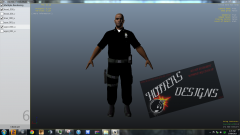
PED PACK COMING SOON (SNEAK PEAK) W.I.P

Hey guys! I am happy to annouce my side project! Its a cop ped pack. What can you expect in this upcoming pack?

Well! You can expect these following things

  • Cop model (Sleeved, and Long shirt, Vest model and High Vis Jacket that randomly spawns! Oh and the obvious, Thigh holster varient! )
  • Female Cop! (Same setup as the other model)
  • Slim Fat cop! (Thats right SLIM)
  • Detective Ped! (Vest varient also a No badge varient) (If you just want a normal looking ped)
Now they are other things to come in this pack. But they shall remain a secret! Only my testers will know when they get the files!

Things are subject to change. So above said things may not be in actual release!

I shall update you soon! :p

From the album:

Hoffers Photos

· 6 images

Account

Navigation

Search

Search

Configure browser push notifications

Chrome (Android)
  1. Tap the lock icon next to the address bar.
  2. Tap Permissions → Notifications.
  3. Adjust your preference.
Chrome (Desktop)
  1. Click the padlock icon in the address bar.
  2. Select Site settings.
  3. Find Notifications and adjust your preference.