
Skip to content
View in the app

A better way to browse. Learn more.

LCPDFR.com

A full-screen app on your home screen with push notifications, badges and more.

To install this app on iOS and iPadOS
  1. Tap the Share icon in Safari
  2. Scroll the menu and tap Add to Home Screen.
  3. Tap Add in the top-right corner.
To install this app on Android
  1. Tap the 3-dot menu (⋮) in the top-right corner of the browser.
  2. Tap Add to Home screen or Install app.
  3. Confirm by tapping Install.

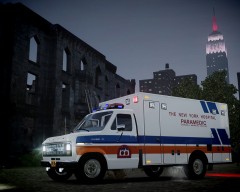
The New York Hospital 1986 Ford E-150 Ambulance

New York Hospital Ford ambulance, based on old footage I got. I guess it was the Presbyterian antecesor...

---

I'm back, my computer seems to be dying. It crashed some days ago and fortunately I could recover most of the mod files (I had to replace both hard drives). However, now the smallest process makes the RAM go through the roof and it can't almost run GTA IV with textures at mid quality:/

  • From the album:

    Strike's

    · 221 images

    Account

    Navigation

    Search

    Search

    Configure browser push notifications

    Chrome (Android)
    1. Tap the lock icon next to the address bar.
    2. Tap Permissions → Notifications.
    3. Adjust your preference.
    Chrome (Desktop)
    1. Click the padlock icon in the address bar.
    2. Select Site settings.
    3. Find Notifications and adjust your preference.