


Skip to content
View in the app

A better way to browse. Learn more.

LCPDFR.com

A full-screen app on your home screen with push notifications, badges and more.

To install this app on iOS and iPadOS
  1. Tap the Share icon in Safari
  2. Scroll the menu and tap Add to Home Screen.
  3. Tap Add in the top-right corner.
To install this app on Android
  1. Tap the 3-dot menu (⋮) in the top-right corner of the browser.
  2. Tap Add to Home screen or Install app.
  3. Confirm by tapping Install.

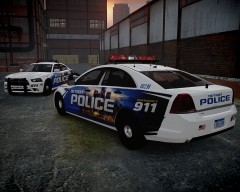
Detroit Police: the future

enb20134318205thumb.jpg

enb2013431581thumb.jpg

Yesterday I came across with an article that showed what, apparently, will be the new Detroit Police Department fleet and paintjob. The new cars, Taurus, Charger and Caprice, supposedly will be deployed by fall.

I decided to make them. A fast work, they just need minor tweaks; today was added to the Caprice the hood decal. I already have to make a Taurus, however I am not sure which model will be used, the 2013 or previous...

From the album:

Strike's

· 221 images

Account

Navigation

Search

Search

Configure browser push notifications

Chrome (Android)
  1. Tap the lock icon next to the address bar.
  2. Tap Permissions → Notifications.
  3. Adjust your preference.
Chrome (Desktop)
  1. Click the padlock icon in the address bar.
  2. Select Site settings.
  3. Find Notifications and adjust your preference.