


3.png.02f667123ecb9d9ee01cb188c824af3e.png "Lore-Style Lenco Bearcat")
6.png.4a62f7b5464d1c45d7d8e9205eeb6642.png)
5.png.c9592aa029bda7218d25117057fde8b6.png)
4.png.df83b35637ac4715866b437765c260b7.png)
3.png.1dc36b756ac20bd90c612109c2622def.png)
2.png.990152b8ae06123a0f6fa971af2cd6d4.png)
1.png.af2fd19859513b42c933a76bdf0d82c4.png)
4.png.03c46c7983f3d293626e279b4133812a.png)
7.png.6320771a6531cf934b69436428cb86f4.png)
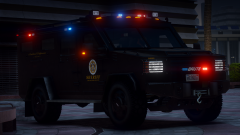
Lore-Style Lenco Bearcat
FrameBGrad.thumb.png.203c596c923420820bcf0c0c7717dcf4.png)
By Jacobmaate
- 1,000 views
- View Jacobmaate's images
Merry Christmas!
I'm pleased to show off some early dev updates on my lore-style Lenco Bearcat, focused mainly around modkit customisation options. You'll be able to utilise a functioning hydraulic ram bar system, as well as equip window screen guards, and various accessories ranging from additional marker lights, takedowns, bumper guides, door stops and a plethora of other options!
Recommended Comments
Join the conversation
You can post now and register later. If you have an account, sign in now to post with your account.