Skip to content
View in the app

A better way to browse. Learn more.

LCPDFR.com

A full-screen app on your home screen with push notifications, badges and more.

To install this app on iOS and iPadOS
  1. Tap the Share icon in Safari
  2. Scroll the menu and tap Add to Home Screen.
  3. Tap Add in the top-right corner.
To install this app on Android
  1. Tap the 3-dot menu (⋮) in the top-right corner of the browser.
  2. Tap Add to Home screen or Install app.
  3. Confirm by tapping Install.

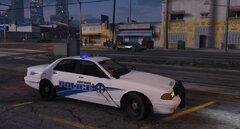
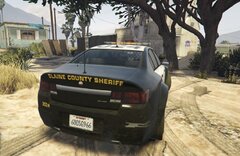
Declasse Premier PPV

always hated the fugitive. its like dropping an Australian car in America. i've long since replaced it with the Vapid Torrence. I'd always liked how RDE replaced the Cheval badges with Declasse ones but since that stopped working i turned to the BCSO pack by Bozza. i replaced the Cheval Badges and i choose to call it the premier as thats the name of the Caprice from old gen. sucks that the Cobalt equivalent now is called the premier.

  • Account

    Navigation

    Search

    Search

    Configure browser push notifications

    Chrome (Android)
    1. Tap the lock icon next to the address bar.
    2. Tap Permissions → Notifications.
    3. Adjust your preference.
    Chrome (Desktop)
    1. Click the padlock icon in the address bar.
    2. Select Site settings.
    3. Find Notifications and adjust your preference.