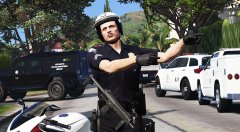
LSPD Traffic. Share https://www.lcpdfr.com/gallery/image/107677-lspd-traffic/ Share on Facebook Share on X {lang="reddit_text" More sharing options... Followers
Reddington Members November 27, 20187 yr Author stats How did you get the MP7 to look as if it was slung over his shoulder and hanging like that? or is that an animation glitch?
t0y Members November 27, 20187 yr Author stats 36 minutes ago, Giordano said: How did you get the MP7 to look as if it was slung over his shoulder and hanging like that? or is that an animation glitch? Kind of looks like an animation error because of his hands still trying to aim it, but looks cool anyways lol.
Reddington Members November 27, 20187 yr Author stats 13 minutes ago, t0y said: Kind of looks like an animation error because of his hands still trying to aim it, but looks cool anyways lol. I thought his hands were doing a pointing animation from some trainer lol. "Go this way!"
Boz Members November 27, 20187 yr (edited) Author stats 2 hours ago, Giordano said: How did you get the MP7 to look as if it was slung over his shoulder and hanging like that? or is that an animation glitch? Attached object to player model Spoiler Kind of looks like an animation error because of his hands still trying to aim it, but looks cool anyways lol. Spoiler I thought his hands were doing a pointing animation from some trainer lol. "Go this way!" He is pointing Edited November 27, 20187 yr by Bozza
Reddington Members November 27, 20187 yr Author stats 2 hours ago, Bozza said: Attached object to player model Hide contents Hide contents He is pointing I've never messed with objects in the trainer. How did you do it?
Dusty Flop Members November 27, 20187 yr Author stats 48 minutes ago, Giordano said: I've never messed with objects in the trainer. How did you do it? It's not too hard to do. Takes some footering around. In Simple Native go to object spawning. Search for objects an example could be carbine. Once spawned select attached objects menu. "Attached last spawned object to player" and then "move attached object (player/bodyguard/ped). You should note that entering vehicles with objects attached to your person is not advisable. Your car will badly react to the objects collision with the car and start flying. I usually attach the objects for photo purposes only.
Reddington Members November 27, 20187 yr Author stats 1 hour ago, Dusty Flop said: It's not too hard to do. Takes some footering around. In Simple Native go to object spawning. Search for objects an example could be carbine. Once spawned select attached objects menu. "Attached last spawned object to player" and then "move attached object (player/bodyguard/ped). You should note that entering vehicles with objects attached to your person is not advisable. Your car will badly react to the objects collision with the car and start flying. I usually attach the objects for photo purposes only. Ahh, think I got it. Trying to angle the gun similar to how you got it was difficult to figure out at first. I wish there was a more legit gun sling option.




Recommended Comments
Join the conversation
You can post now and register later. If you have an account, sign in now to post with your account.