


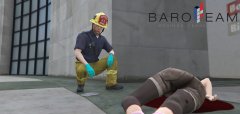
![[WIP] Improved Fire Departement](http://s3-gallery.int-cdn.lcpdfrusercontent.com/monthly_2016_10/large.20161023113916_1.jpg.b8a3069077b7671ade47641dfd12643d.jpg)
[WIP] Improved Fire Departement
US Fire Departement Improvement Pack :
LAFD :
- [ X ] Paramedic regular outfit
- [ ] Paramedic bunker gear
- [ ] EMS Supervisor regular outfit
- [ ] EMS Supervisor bunker Gear
- [ ] Battalion Chief Bunker Gear
- [ X ] Battalion Chief Fire house
- [ X ] Captain Bunker Gear
- [ ] Captain Fire House gear
- [ ] Fire house gear
- [ X ] Driver
- [ ] Water Rescue Unit (Swimmer/Boat operator)
- [ ] USAR
LAcoFD :
- [ X ] Paramedic regular outfit
- [ ] Paramedic bunker gear
- [ ] EMS Supervisor regular outfit
- [ ] EMS Supervisor bunker Gear
- [ ] Battalion Chief Bunker Gear
- [ X ] Battalion Chief Fire house
- [ X ] Captain Bunker Gear
- [ ] Captain Fire House gear
- [ ] Fire house gear
- [ X ] Driver
- [ ] Water Rescue Unit (Swimmer)
- [ X ] Helicopter Pilot/Operators
- [ X ] Lifeguard
BCFD (Fictional) :
- [ X ] Paramedic regular outfit
- [ ] Paramedic bunker gear
- [ ] Battalion Chief (Cpt) Bunker Gear
- [ ] Battalion Chief Fire house
- [ X ] Lieutenant Bunker Gear
- [ ] Lieutenant Fire House gear
- [ ] Fire house gear
- [ X ] Regular Bunker Gear
- [ X ] Driver
- [ ] Montagne SAR Team
Other :
- [ X ] USFS Firefighter (only bunker)
- [ ] USFS Helicopter crew (pilot/operator)
- [ X ] Halligan Tool
- [ X ] Sledge Hammer
- [ X ] Pick pole

75 images
-
By Baud0412
-
By Baud0412
-
By Baud0412 · 2 comments
-
By Baud0412
-
By Baud0412
-
By Baud0412
-
By Baud0412
-
By Baud0412
-
By Baud0412
-
By Baud0412
-
By Baud0412
-
By Baud0412
-
By Baud0412
-
By Baud0412
-
By Baud0412
-
By Baud0412
-
By Baud0412
-
By Baud0412
-
By Baud0412
-
By Baud0412
-
By Baud0412
-
By Baud0412
-
By Baud0412
-
By Baud0412
-
By Baud0412




Recently Browsing 0
- No registered users viewing this page.
2 Album Comments
There are no comments to display.
Join the conversation
You can post now and register later. If you have an account, sign in now to post with your account.