Skip to content
View in the app

A better way to browse. Learn more.

LCPDFR.com

A full-screen app on your home screen with push notifications, badges and more.
To install this app on iOS and iPadOS
  1. Tap the Share icon in Safari
  2. Scroll the menu and tap Add to Home Screen.
  3. Tap Add in the top-right corner.
To install this app on Android
  1. Tap the 3-dot menu (⋮) in the top-right corner of the browser.
  2. Tap Add to Home screen or Install app.
  3. Confirm by tapping Install.
The latest updated version of RAGE Plugin Hook, required to play LSPDFR, can be found inside the LSPDFR download. It is not currently available on the RAGE Plugin Hook website.

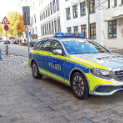
Bluelights dark on police vehicle

Featured Replies

So, today a few hours after i closed GTA LSPDFR i opened it again t play again, but the lights were dark, the blue reflected on the walls and stuff, but the lights itself on the vehicles are dark. And dont tell me to download Radiance or other mods that do the same thing, they dont work!

Solved by UnknownBastion

  • Community Team
  • Solution

You can try editing the visualsettings.dat (found in mods > update > update.rpf > common > data). Please change the following entries:

car.defaultlight.day.emissive.on 1700.00
car.defaultlight.night.emissive.on 1100.00

Lastly, make sure your PostFX and Shader Quality are set to at least High.

Help us to help you! 


Report Site Guideline violations by selecting the three dots at the top right of posts!

  • Author

Thank you for the fast reply, and it worked!
Maybe it has to do with the thing, that i deleted the visualsettings.dat a few hours earlier.
 

Thanks!

  • Community Team
3 minutes ago, Zib said:

Thank you for the fast reply, and it worked!
Maybe it has to do with the thing, that i deleted the visualsettings.dat a few hours earlier.
 

Thanks!

Yeah...it could be it. When you delete the mods folder one, it will revert back to using the default one outside the mods folder. Making most enhanced lighting very dim.

Help us to help you! 


Report Site Guideline violations by selecting the three dots at the top right of posts!

  • Author

I didnt delete the mods folder, i deleted the .dat file, bcause a vehicle mod, witch had the .dat file in it (look at the picture).
But the .dat file kinda corrupted everything, so i deleted it, but now i used the exact same one from the vehicle mod (file from picture) but it works again.

Could contain: text, screenshot, display, software, computer icon, operating system, multimedia software, web page, office application software

  • Community Team
Just now, Zib said:

I didnt delete the mods folder, i deleted the .dat file

That is what I am saying. If you delete the .dat file in the mods folder, it will revert back to the one outside the mods folder with the vanilla settings. And will make any custom vehicles' lights dim, as it is using the default settings.

Help us to help you! 


Report Site Guideline violations by selecting the three dots at the top right of posts!

This is a support topic.
Only reply here to offer help or assistance to Zib. Off-topic or "me too" replies will be removed.

Need support yourself? Make a new topic instead.

Join the conversation

You can post now and register later. If you have an account, sign in now to post with your account.

Guest
Reply to this topic...

Similar Content

Recently Browsing 0

  • No registered users viewing this page.

Account

Navigation

Search

Search

Configure browser push notifications

Chrome (Android)
  1. Tap the lock icon next to the address bar.
  2. Tap Permissions → Notifications.
  3. Adjust your preference.
Chrome (Desktop)
  1. Click the padlock icon in the address bar.
  2. Select Site settings.
  3. Find Notifications and adjust your preference.