
Skip to content
View in the app

A better way to browse. Learn more.

LCPDFR.com

A full-screen app on your home screen with push notifications, badges and more.

To install this app on iOS and iPadOS
  1. Tap the Share icon in Safari
  2. Scroll the menu and tap Add to Home Screen.
  3. Tap Add in the top-right corner.
To install this app on Android
  1. Tap the 3-dot menu (⋮) in the top-right corner of the browser.
  2. Tap Add to Home screen or Install app.
  3. Confirm by tapping Install.

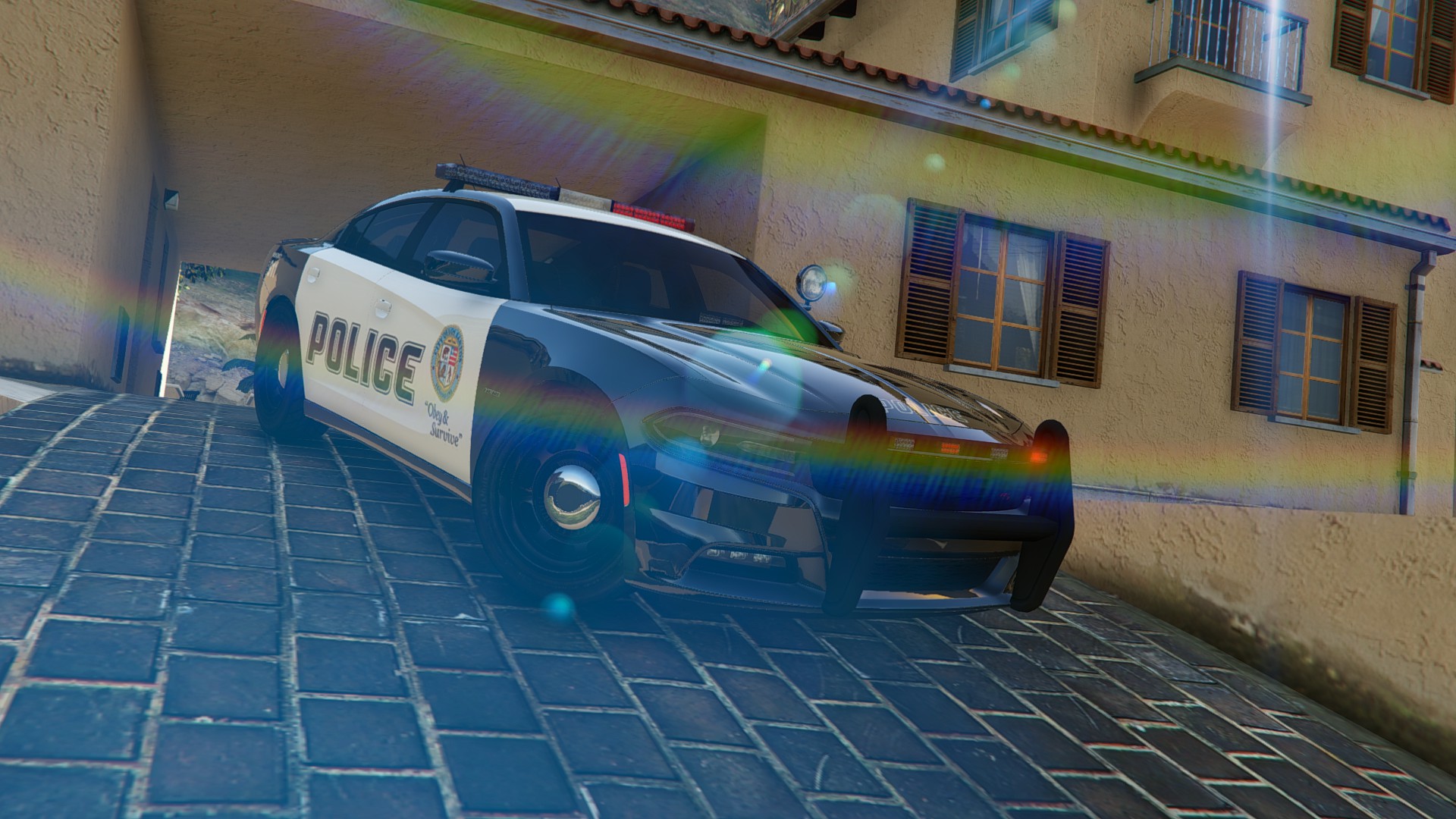
2015 Dodge Charger RT Police 2.0

(38 reviews)

9 Screenshots

2015 Dodge Charger RT Police
The original model from Forza Horizon 2 
Converted to GTA 5 By KAMELKFB 

Open readme.txt for installation 

Feel free to make custom skin


Bugs: Windows won't break ,No engine on it 

Attention DO NOT REUPLOAD THE FILE IN ANOTHER SITE or EDIT THE CAR

User Feedback

Recommended Comments

Fonespiders

Members

Anyone coming out with bad skins like its stretched, and blurred? Any help with this?

sargecommander

Members

(edited)

Hi, I Love this car, and it works great, but I have noticed a few bugs, which I don't know if only myself or if other people are experiencing.

First, even during the day the middle part of the rear light bar is always on.

Second, the white lights are being used as brake lights instead of the rear light bar.

Third,  The indicator on either side does not show during the night. (I don't know whether this is a car problem or an Improved Corona... problem, I have edited the Improved Corona so the indicators are not on during night.)

I think there has been comments about this already but the doors don't have any sounds to them, and they don't react to physics (breaking off, moving while turning.)

I don't know whether there is a fix to any of these problems, but I thought I'd let you know for when you're making patches to this car, again I am loving this car, good work :D

2015-08-30_00001.jpg

2015-08-30_00002.jpg

2015-08-30_00004.jpg

Edited by sargecommander

boxer84

Members

anyone else have the bug where if they get into the passenger side door it acts like its still open even though it doesn't react to physics? only way to reset it to closed seems to be with a trainer and doing a magic repair.

does that to me when i use the police mod 1.0c and b. have not tried it with lspdfr, just get out and get back in and it re closes.

Arxhive

Members

After countless hours of play with this vehicle, I feel the need to offer this brutally honest input in order to assist the author.

It's a beautiful conversion, honestly. Great looking vehicle and lots of lights, as it should be. Now the not-so-pleasant.

  • The dashboard LEDs and the rear-windshield LED lights do not light up properly, the texture on the light module itself doesn't light up the same way the lightbar/bullbar LEDs do.
  • The right side of the car has serious issues. The car nearly flips over upon contact between the right-side skirt and sidewalks, as well as certain vehicles. In addition to this, every time my partner exits the vehicle on the passenger side, it starts bugging out and glitching (bouncing around, etc.) This really has to be fixed.
  • The doors. I cannot stress the doors enough. They lack collisions, sounds, and do not behave like the doors of other vehicles in the game. They do not close automatically (noticed mostly while playing PoliceMod 2) upon putting a suspect in the back of the vehicle. The only way to close the doors is using a trainer to fix the vehicle. This needs to be fixed. It's a serious issue and breaks the fun of the vehicle. 
  • As @sargecommander mentioned, the lights are another cosmetic issue. Even during the daytime the center part of the rear lights is always on. It's annoying to say the least. The white reverse lights are being used as brake lights instead of the rear light bar like the actual IRL Charger.

This is an amazing conversion and a much-needed police vehicle mod, don't get me wrong. It just feels a tad rushed and like the author didn't spend enough time bug-testing the car before getting it out to the public police modding community. Outstanding work, but an update is needed

goigle

Members

Great model and work, I suggest raising the suspect raising the suspension a tad as it makes it hard to go over curbs. Also, the rear indicator lights do not function if the vehicles nighttime headlights are on.


Really love the lighting package otherwise :~)

goigle

Members

Second, the white lights are being used as brake lights instead of the rear light bar.


2015-08-30_00002.jpg


This is a lighting/color issue, those are the brake lights and are red (just very washed out). The white lights for reverse are on the trunk.

sargecommander

Members

This is a lighting/color issue, those are the brake lights and are red (just very washed out). The white lights for reverse are on the trunk.

Is there a way to fix it? Or is this a problem that is a bug with the current version?

goigle

Members

Bug with current version I believe

xAzDKr

Members

This does not work in any other slot besides police2. If I put it in police3, it will still spawn in as police2 :S

thegreathah

Friends of LSPDFR

This does not work in any other slot besides police2. If I put it in police3, it will still spawn in as police2 :S

Did you rename the files?

xAzDKr

Members

Did you rename the files?

yes, I renamed it to match up with the usual police3 file names and still no luck

thegreathah

Friends of LSPDFR

yes, I renamed it to match up with the usual police3 file names and still no luck

Strange. Are you putting them in the x64e or the patch3ng file?

PopoHonnator

Members

It says im not allowed to download this when I try to! I really want this skin, so please help! :)

PopoHonnator

Members

Hi there,

I've having some troubles getting vehicle textures to work for a long time now. It seems only vehicle texts won't work for me as all my other textures I mod work, such as ped, audio and weapon texts.

I tried using this texture as well as several others, they all end up looking like this (in the pictures attached).

Note that the vehicle model is the BMW from http://www.lcpdfr.com/files/file/8552-swedish-k9-unit-bmw-5-series/?tab=comments

But that same mushy texture appears on the dodge one from this download.

Anyone with any constructive ideas? Really desperate here.

Thanks!

bmw swe mistext 3.jpg

bmw swe mistext2.jpg

bmw swe mis text1.jpg

xAzDKr

Members

(edited)

Hi there,

I've having some troubles getting vehicle textures to work for a long time now. It seems only vehicle texts won't work for me as all my other textures I mod work, such as ped, audio and weapon texts.

I tried using this texture as well as several others, they all end up looking like this (in the pictures attached).

Note that the vehicle model is the BMW from http://www.lcpdfr.com/files/file/8552-swedish-k9-unit-bmw-5-series/?tab=comments

But that same mushy texture appears on the dodge one from this download.

Anyone with any constructive ideas? Really desperate here.

Thanks!

make sure the models and textures you have are for the correct car

Strange. Are you putting them in the x64e or the patch3ng file?

x64e in my mods folder

I have also tried assigning the 99 slicktop cvpi to police2 and having the charger in police3

The slicktop cvpi doesnt show up at all, the charger shows up in police2, and the vanilla interceptor is in police3 :S

Edited by xAzDKr

thegreathah

Friends of LSPDFR

make sure the models and textures you have are for the correct car

x64e in my mods folder

I have also tried assigning the 99 slicktop cvpi to police2 and having the charger in police3

The slicktop cvpi doesnt show up at all, the charger shows up in police2, and the vanilla interceptor is in police3 :S

try the patch3ng folder, Police 3 and 2 have to be replaced there, and it wouldn't hurt to put police there either.

xAzDKr

Members

try the patch3ng folder, Police 3 and 2 have to be replaced there, and it wouldn't hurt to put police there either.

is that a part of x64e?

thegreathah

Friends of LSPDFR

(edited)

is that a part of x64e?

No, go into the the folder: Main directory/update/x64/dlcpacks/patchday3ng/dlc.rpf/x64/levels/gtav/vehicles.rpf

Edited by thegreathah

xAzDKr

Members

No, go into the the folder: Main directory/update/x64/dlcpacks/patchday3ng/dlc.rpf/x64/levels/gtav/vehicles.rpf

got my cars to go where I wanted in police 2 and sheriff, still being stubborn with police3

thegreathah

Friends of LSPDFR

got my cars to go where I wanted in police 2 and sheriff, still being stubborn with police3

alrighy, try doing the same in patch4ng or 5ng they have pretty much the same root.

xAzDKr

Members

alrighy, try doing the same in patch4ng or 5ng they have pretty much the same root.

patch day 4 did it, thank you for your help

thegreathah

Friends of LSPDFR

patch day 4 did it, thank you for your help

No problem bud :)

PopoHonnator

Members

make sure the models and textures you have are for the correct car

x64e in my mods folder

I have also tried assigning the 99 slicktop cvpi to police2 and having the charger in police3

The slicktop cvpi doesnt show up at all, the charger shows up in police2, and the vanilla interceptor is in police3 :S

Could you elaborate on that? I'm not quite following. The models and textures should be correct as I am following the install instructions 100%

xAzDKr

Members

Could you elaborate on that? I'm not quite following. The models and textures should be correct as I am following the install instructions 100%

Issue has been resolved with the help of @thegreathah thank you for offering though!

PopoHonnator

Members

Issue has been resolved with the help of @thegreathah thank you for offering though!

Sorry but I meant the issue referring to the one I posted earlier today
 

Hi there,

I've having some troubles getting vehicle textures to work for a long time now. It seems only vehicle texts won't work for me as all my other textures I mod work, such as ped, audio and weapon texts.

I tried using this texture as well as several others, they all end up looking like this (in the pictures attached).

Note that the vehicle model is the BMW from http://www.lcpdfr.com/files/file/8552-swedish-k9-unit-bmw-5-series/?tab=comments

But that same mushy texture appears on the dodge one from this download.

Anyone with any constructive ideas? Really desperate here.

Thanks!

bmw swe mistext 3.jpg

bmw swe mistext2.jpg

bmw swe mis text1.jpg

Create an account or sign in to comment

Account

Navigation

Search

Search

Configure browser push notifications

Chrome (Android)
  1. Tap the lock icon next to the address bar.
  2. Tap Permissions → Notifications.
  3. Adjust your preference.
Chrome (Desktop)
  1. Click the padlock icon in the address bar.
  2. Select Site settings.
  3. Find Notifications and adjust your preference.












