


FRENCH:
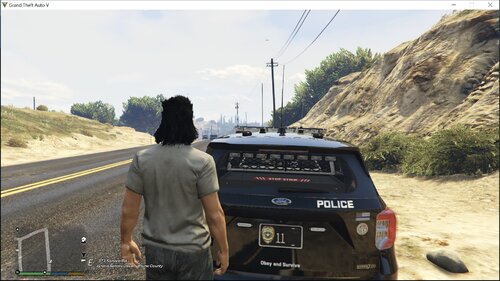
Bonjour, aujourd'hui je vous présente mon pack de texture qui s'inspiré de la police d'Ottawa . C'est la première fois que je crée des textures  .
.
Le pack fonctionne seulement pour les modeles LSPD crée par Yard1 : https://www.lcpdfr.com/files/file/5515-lspd-pack-els-v8/
Les différents modèles disponible :
-Vapid Cruiser (police)
-Interceptor (police2)
-Buffalo (noose)
-Granger SWB (polpatriot)
Il est obligatoire d'avoir le mod ELS v.8 (Emergency Lighting System) pour le bon fonctionnement des modeles !
ENGLISH: ( SORRY MY ENGLISH IS VERY BAD  )
)
Hello, today I present you my pack of texture which is inspired by the police of Ottawa. It is the first time when I create textures .
The pack works only for models LSPD create by Yard1: https://www.lcpdfr.com/files/file/5515-lspd-pack-els-v8/
The model need ELS v.8 (Emergency Lighting System) !
The various models:
-Vapid Cruiser (police)
-Interceptor (police2)
-Buffalo (noose)
-Granger SWB (polpatriot)
Thanks Bye
Texture: bacisniper62





.thumb.png.1204360f255576d56e92a6424aff328e.png)


![[EUP] Merryweather Security Mini-Pack](http://s3-screenshots.int-cdn.lcpdfrusercontent.com/resize/500/-/monthly_2026_07/271590_12.thumb.jpg.470e8fbf575eee28324aa8adedd253b0.jpg)



Recommended Comments
Create an account or sign in to comment