


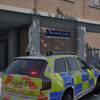

FiveM-Style Vehicle Entry
FiveM-Style Vehicle Entry fixes the issue where characters get stuck or stranded outside when GTA V runs out of standard entry animations for custom multi-seat vehicles.
Designed specifically for LSPDFR and custom emergency setups, this script automatically teleports characters directly into open seats when default entry sequences fail or reach their limit. It ensures full passenger capacity for police transport vans, prisoner hauliers, tactical response vehicles, and other multi-passenger rides without relying on exterior hanging points.
Key Features
Direct Seat Teleportation: Automatically warps characters into available seats when standard entry animations run out or cannot execute.
LSPDFR Emergency Vehicle Support: Full support for multi-occupant police vans, prisoner transports, and SWAT trucks with custom seating layouts.
FiveM-Style Handling: Mirrors the fast, seamless vehicle entry behaviour found on FiveM servers.
Full Cabin Use: Allows peds to occupy internal seats that would otherwise be completely inaccessible due to GTA V animation limits.
Required Dependencies
Install and update all dependencies before running the script:
ScriptHookV: https://www.dev-c.com/gtav/scripthookv/
ScriptHookVDotNet (Nightly): https://github.com/scripthookvdotnet/scripthookvdotnet-nightly/releases
SHVDN3 (LemonUI): https://www.gta5-mods.com/tools/lemonui
Short Description
AI disclosure
The author has disclosed that AI tools were used in creating the following aspects of this file:
- Description
- Images
- Mod and Mod Content (Moderate)
Helped with bug fixes and worked to 100%









Recommended Comments
Create an account or sign in to comment