




.gif.7f36b2b745b2edd60539acac109af7a8.gif)


ARORA VOID SCANNER: OVERDRIVE
The Ultimate Next-Generation Tactical AR Feed for LSPDFR.
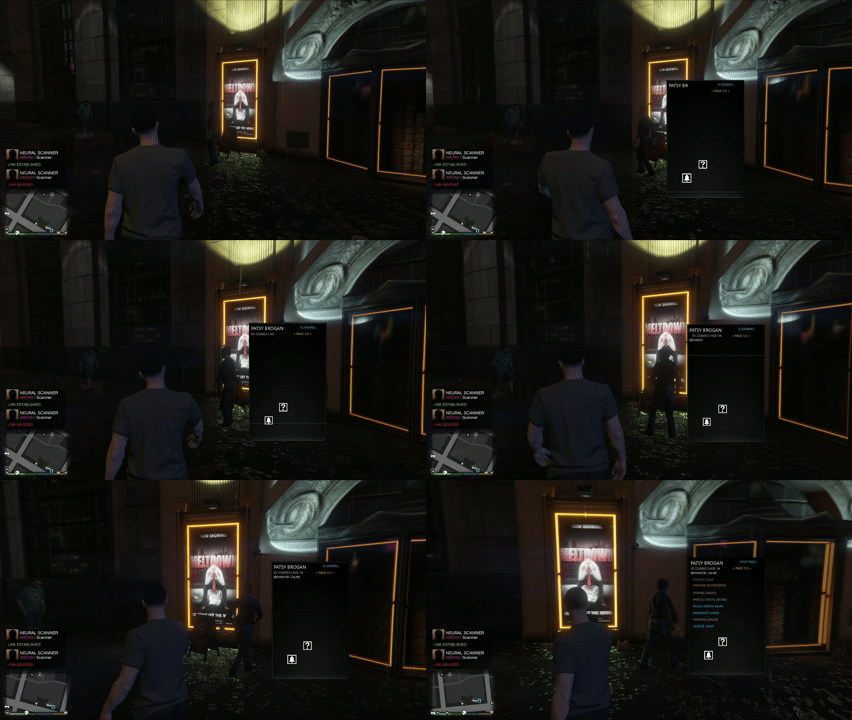
Welcome to the future of policing. Arora Void Scanner is a highly advanced, zero-lag Augmented Reality (AR) holographic overlay designed to give you real-time, deep-sync intelligence on any Pedestrian or Vehicle in Los Santos.
Gone are the days of boring text menus. Void Scanner projects a highly customizable, animated, 3D holographic datapad directly into your game world, physically anchored to your targets.
THE HYBRID DEEP-SYNC ENGINE
Void Scanner doesn't just guess data—it reads minds. This plugin features a revolutionary "Deep Sync Engine" that perfectly integrates with the community's favorite overhaul mods.
Stop The Ped (STP) Integration: Fully syncs with STP's internal API and Metadata. When you scan a suspect, Void Scanner instantly pulls their exact Gun Permits, Alcohol/Drug influence, and even reads the exact contents of their pockets and vehicle trunk before you even run a physical search.
Policing Redefined (PR) Integration: Uses Deep Reflection to peek into PR's
PedRuntimeDatamemory, flawlessly displaying PR's native Moods, Resistance Probability, Surrender Probability, and native Hunting/Fishing Permits.The "Reverse-Sync" Feature: If you use STP (which lacks native Hunting/Fishing licenses), Void Scanner will generate those missing licenses and instantly inject them back into the ped's brain, ensuring that the rest of your mods are perfectly synced with your scanner.
Smart Exclusivity: The engine intelligently detects what you have installed and routes the data flawlessly, completely preventing mod conflicts.
TACTICAL FEATURES & BIOMETRICS
ALPR Override: Look at any vehicle and instantly receive a holographic read-out of its Model, Plate, live Speed, Registration, Insurance, and Trunk Contents.
Live Biometrics: Animated biological bars react to the suspect's state. Watch their Heart Rate (HR), Blood Pressure (BP), SpO2, and Stress Levels spike dynamically if they are fleeing, in combat, or have a gun drawn on them.
Dynamic Lore Generation: Suspects are generated with realistic Jobs, Income, Criminal Histories, Warrants, Parole Status, and CCW (Concealed Carry) probabilities.
Contextual Threat Icons: The UI dynamically generates glowing, animated icons based on the situation (e.g., Glowing Red Skull for Wanted, Orange Running Man for Fleeing, Blue Handcuffs when detained).
TOTAL CUSTOMIZABILITY (NO CODING REQUIRED)
KEYBINDS & CONTROLS
Enable Diagnostics Test Key (Z): Toggles the ability to spawn a test pedestrian. Turn this off if you accidentally hit Z during regular gameplay.
Main Menu Key & Modifier: Change the key used to open this exact menu (Default: I). You can add a modifier (like Shift or Ctrl) so it requires two keys to open.
Editor Mode Key & Modifier: Change the key used to enter the F10 Drag-and-Drop Hologram Studio.
PRESET MANAGER
Load Custom Preset: Instantly swap to a different layout you have saved previously.
Save Custom Preset: Type in a name (e.g., "NightMode" or "Minimalist") to save your exact current layout, colors, and keybinds.
Reset UI Positions: Messed up your Drag-and-Drop layout? Click this to snap all text and icons back to their default, factory-perfect positions.
SCANNER POSITION & AR
Auto-Scan on Interact (E): If enabled, pressing your interaction key (E) near a ped or vehicle will automatically scan them.
Anchor to 3D World: If ON, the scanner projects as a physical hologram floating next to the suspect in the world. If OFF, it becomes a static 2D HUD locked to your screen.
Dynamic Depth Scaling: If ON, the hologram shrinks and grows naturally as you walk closer to or further from the suspect.
AR Anchor Point: Choose where the physical hologram hovers (Head, Chest, or Pelvis).
Targeting Style: Choose how the scanner visually links to the suspect (Solid Line, Dashed Line, 3D Bounding Box, or None).
Line Color: Type a color name (like "Red") or hex code (like "#FF0000") for the targeting line.
Scanner Offsets & Frame Sizing: Manually adjust the exact width, height, and X/Y positioning of the background frame.
TOGGLE DATA BLOCKS
Don't want certain information cluttering your screen? Simply turn them off here!
Show Lore Block: Toggles the Job, Income, and personal Notes.
Show CCW Alert: Toggles the Concealed Carry Probability warning.
Show Criminal History: Toggles the rap sheet.
Show ALPR Network: Toggles vehicle data (Speed, Registration, Insurance).
Show Biometrics: Toggles the live API sync data (Moods, Resistance, Surrender rates).
ADVANCED TEXT ENGINE
This menu contains a sub-folder for every single line of text on the scanner. Inside each text line's menu, you can edit:
Visible Element: Turn this specific line on or off.
Text / Macro: Edit what the text says! You can type plain words, or use macros like
{NAME}or{AGE}to let the engine fill in the blanks.Assigned Page: Move this text to Page 1, Page 2, or Page 3 (which you cycle through using PageUp/PageDown).
Font, Color, & Animation: Make the text glitch, pulse, or typewrite in any color and font you want.
BIOMETRIC BARS CONFIG
Show Animated AR Bars: Turn the live EKG / Heartbeat visualizers on or off.
Global Bar Width: Make the bars wider or narrower to fit your custom layout.
Individual Bar Menus (Stress, HR, BP, etc.): Go in here to change the color and choose from 30 different animation styles (like "EKG Pulse", "Digital Rain", or "Warning Strobe").
CUSTOM HOLOGRAM BUILDER
Want to add your own police department badge or a custom glowing reticle to the scanner?
Place any
.pngimage into yourPlugins/LSPDFR/VoidTrace/Iconsfolder.Select it from the Select Image list.
Choose a Visibility Link (e.g., tell it to only appear if the suspect is Wanted, or only if they are In a Vehicle).
Set the Glow Color and Animation.
Click Add to HUD. You can then press F10 to drag it wherever you want!
THREAT ICON CONFIGS (Wanted, Combat, DUI, etc.)
Your scanner uses smart icons that only appear when specific conditions are met. Go into these folders to swap out the .png icon, change its glowing color, alter its size, or make it strobe/pulse when the suspect becomes a threat.
DATABASE DEBUG (Master Override)
Master Override Mode: Turn this ON to completely detach the scanner from the game world.
Force Toggles: Use the checkboxes below it to manually force the scanner to think the ped is Wanted, Drunk, Cuffed, or Dead. This is an essential tool for creating and testing your custom layouts so you don't have to spend hours searching for a drunk pedestrian just to see if your DUI icon looks good!
SYSTEM MAINTENANCE
Clear / Reset VoidTrace.ini: The nuclear option. If you completely break your layout, mess up your text, or experience severe glitches, click this. It deletes your configuration file and completely restores the scanner to its pristine, factory-default state.
INSTALLATION
Open the downloaded ZIP file.
Highlight all contents (the
Pluginsfolder andLemonUI.RPH.dll).Drag and drop them directly into your Main Grand Theft Auto V directory.
Load the game and go On Duty.
Have Fun.


REQUIREMENTS
RagePluginHook (Latest Version)
LemonUI.RPH.dll (Included in the download)
Highly Recommended: Stop The Ped by BejoIjo OR Policing Redefined. (The scanner works flawlessly standalone, but truly shines when synced with these mods).
CONTROLS & USAGE
(All keys can be changed in the in-game Keybinds Menu!)
E (Context): Auto-Scan the ped/vehicle directly in front of you.
X: Hard-lock / Disconnect the neural link from a distant target (aim your gun/camera and press X).
I: Open the Void Scanner Overdrive Menu to tweak colors, animations, toggles, and layout settings.
F10: Toggle the Drag-and-Drop Hologram Editor Mode.
Page Up / Page Down: Cycle through the Scanner Data Pages (Core ID, Biometrics, Lore/History).
Z: Spawn a Diagnostic Test Subject (Can be disabled in settings).
Created by Team Arora.
IF YOU LIKE MY PROJECTS PLS SUPPORT ME IT GIVES ME MOTIVATION AND I NEED SOME MONEY FOR CIGS CUZ IM BROKE AS F
AUGUST MOD SHOP | Whop
Short Description
AI disclosure
The author has disclosed that AI tools were used in creating the following aspects of this file:
- Description
- Images
- Mod and Mod Content (Substantial)
Well, I'm learning C# and I'm below mid-level developer while making this mod I made a lot of mistakes and I just couldn't find any solutions, so I took bit help of Gemini made the code better and optimized .. This took me a lot of time and effort but in the end i made something that i liked and i hope yell will like it too ty for downloading my mod



![Riverside Department Pack [ EUP Pack FiveM Ready Replace ]](http://s3-screenshots.int-cdn.lcpdfrusercontent.com/resize/500/-/monthly_2026_10/image1.thumb.png.21ff38790ad75e97e1aff3b367b36fda.png)



.thumb.png.59d05d91e184fd0e413931530914fdf4.png)



![Riverside County Sheriff Office EUP [FiveM Ready Male Only]](http://s3-screenshots.int-cdn.lcpdfrusercontent.com/resize/500/-/monthly_2026_10/image1.thumb.png.610ced849b902200c1e41060ec521220.png)


Recommended Comments
Create an account or sign in to comment