


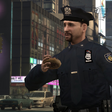


Here is a small edit I made today inspired by the heavy rainfall in SoCal this week!
This is an edit of the vanilla hat with an LAPD badge added and a rain cover! This has only been tested by me on EUP 9.6, but I'm sure it will work fine on other versions. You can rename the file to whatever of your choosing.
I can't remember who made the badge for the hat, it's been on my PC for 6+ years. If you remember sending me the badge, please let me know so I can give you proper crediting!
Please report any bugs, thanks!
Edited by aerodynic
Short Description
Keep your head covered and your hair dry!
Hat model - Rockstar Games
Hat edit - Aerodynic
Hat badge - Unknown
Hat edit - Aerodynic
Hat badge - Unknown

![[DLS] RSO 2025 Silverado (Reflective)](http://s3-screenshots.int-cdn.lcpdfrusercontent.com/resize/500/-/monthly_2026_08/MedalTVGrandTheftAutoV20260712015343617.thumb.webp.017623971017771f7a1d836cba5ec17e.webp)
![[LIVERY] Calgary Humane Society Tahoe](http://s3-screenshots.int-cdn.lcpdfrusercontent.com/resize/500/-/monthly_2026_08/GrandTheftAutoVScreenshot2026_08.02-18_46_07_15.thumb.png.7806bb6b3a83ef885bce6ec7f16e8d57.png)




Recommended Comments
Create an account or sign in to comment