Skip to content
View in the app

A better way to browse. Learn more.

LCPDFR.com

A full-screen app on your home screen with push notifications, badges and more.

To install this app on iOS and iPadOS
  1. Tap the Share icon in Safari
  2. Scroll the menu and tap Add to Home Screen.
  3. Tap Add in the top-right corner.
To install this app on Android
  1. Tap the 3-dot menu (⋮) in the top-right corner of the browser.
  2. Tap Add to Home screen or Install app.
  3. Confirm by tapping Install.

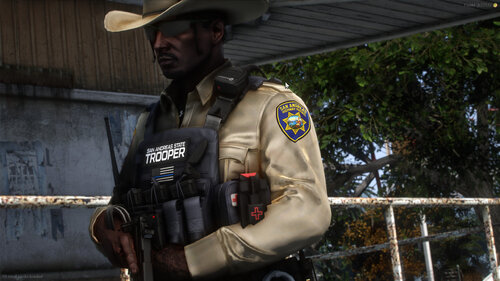
BCSO Eup mini pack 1.0.0

(0 reviews)

13 Screenshots

Male and female

Drag and drop replace

Class As Bs and Cs

A couple vests and the mbu stuff

The helmet is far too bright but I don't care

I made this a while ago, let me know if there are any issues


Short Description

Male and Female BCSO eup for singleplayer. Drag and drop install

User Feedback

Recommended Comments

D.Riggins4L01

Members

How did you change the color to black normally the shirts are tan. I been wanting to edit my uniforms 

BrayPug25

Members Author

I use paint.net, all my information for creating my packs are listed in the credits section

Create an account or sign in to comment

Latest Mods

Account

Navigation

Search

Search

Configure browser push notifications

Chrome (Android)
  1. Tap the lock icon next to the address bar.
  2. Tap Permissions → Notifications.
  3. Adjust your preference.
Chrome (Desktop)
  1. Click the padlock icon in the address bar.
  2. Select Site settings.
  3. Find Notifications and adjust your preference.