Skip to content
View in the app

A better way to browse. Learn more.

LCPDFR.com

A full-screen app on your home screen with push notifications, badges and more.

To install this app on iOS and iPadOS
  1. Tap the Share icon in Safari
  2. Scroll the menu and tap Add to Home Screen.
  3. Tap Add in the top-right corner.
To install this app on Android
  1. Tap the 3-dot menu (⋮) in the top-right corner of the browser.
  2. Tap Add to Home screen or Install app.
  3. Confirm by tapping Install.

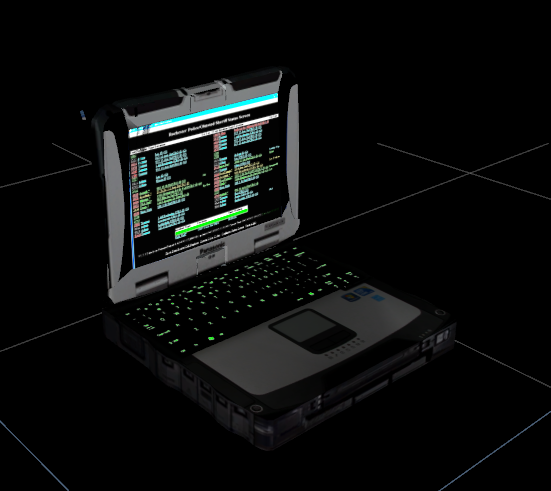
Sexy Roughbook 1.0.0

1 Screenshot

Spoiler


Credits: Original Base Model: Cap'n Crunch
Optimizing Poly's: JBD
Re-Texturing: JBD
Keyboard Emissive: JBD
Screen Emissive: JBD

THIS MODEL IS NOT 100% COMPLETE. ITS A DEV MODEL, THERE ARE TEXTURE ISSUES.

Join muh discord: https://discord.gg/q3QhsNE


User Feedback

Recommended Comments

AvidMods

Members

It Is Indeed Sexy. 5/5 Stars 

JohnBD

Members Author

Just now, AvidMods said:

It Is Indeed Sexy. 5/5 Stars 

Haha thanks, I'm calling it the rough book since it isn't done yet. I just couldn't find any good tough books with keyboard emissives so here she is.

TickleMyElmo

Members

very swell 

JamFan

Members

its called a Toughbook.

JohnBD

Members Author

4 minutes ago, JacobMC said:

its called a Toughbook.


3 hours ago, JohnBD said:

Haha thanks, I'm calling it the rough book since it isn't done yet. I just couldn't find any good tough books with keyboard emissives so here she is.


Lux

Members

why i havent a keyboard?

5 minutes ago, Lux said:

why i havent a keyboard?

sry, just a bug in zmod!

Lux

Members

in love with it! 5/5

BOYDEAD02

Members

What happen to the keyboard can you fix it please and thank you 

Dr. Gread

Members

Hey mate! That's an awsome one, but is there a chance you have the blender file, or an obj version somewhere?

Cheers!
MG

Create an account or sign in to comment

Latest Mods

Account

Navigation

Search

Search

Configure browser push notifications

Chrome (Android)
  1. Tap the lock icon next to the address bar.
  2. Tap Permissions → Notifications.
  3. Adjust your preference.
Chrome (Desktop)
  1. Click the padlock icon in the address bar.
  2. Select Site settings.
  3. Find Notifications and adjust your preference.