


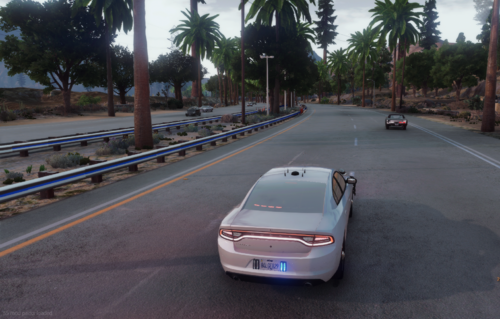
BMW 530D Familiar Mossos d'Esquadra (catalonia police)
Skin made by sergioo_24
-Si os gusta, darle a like. Y si queréis, podéis donar;)
My other mod, the BMW X5 Mossos d'Esquadra skin made by me: https://es.gta5-mods.com/vehicles/bmw-x5-2016-mossos-d-esquadra-catalonia-police-spain
INSTALL
1.First, you need download and install this mod: https://es.gta5-mods.com/vehicles/2015-police-bmw-530d-pack
Follow her instructions
2.Then, use OpenIV and drop my files in: GTAV/Mods/X64e.rpf/levels/gta5/vehicles.rpf
------------
INSTALACIÓN:
1. Primero, necesitas descargar e instalar este mod. Acuérdate de seguir sus instrucciones: https://es.gta5-mods.com/vehicles/2015-police-bmw-530d-pack
2. Luego, usa OpenIv y remplaza los archivos anteriores por los míos en la siguiente dirección: GTAV/Mods/X64e.rpf/levels/gta5/vehicles.rpf
3. Disfruta!!!
Made by sergioo_24//Hecho por sergioo_24
-Comment any bug or suggestion
-Comenta cualquier bug, crítica o sugerencia
More mods in https://es.gta5-mods.com/users/sergioo_24
DO NOT REDISTRIBUTE WITHOUT PERMISSION. Only available on LCPDFR and GTA V
► Police BMW 530D Saloon & Touring ◄
GTA SA BMW 530D Touring Model: URM
3D Model BMW 530D Touring: Arkviz
2015 Model: BritishGamer88,Matthew Cammack
Correct Trim: Matthew Cammack
Window Template: BritishGamer88
Lightbar: 3Dwarehouse
Lightbar Stand: Matthew Cammack
Wheels: Forza Motorsport
Number Plates: Bleep911
Lightbar Textures: BritishGamer88
Skins: BritishGamer88
Window Texture: BritishGamer88
Template - BritishGamer88
Interior Fixes - BritishGamer88
Working Bonnet/Boot - BritishGamer88
Convert to GTAV - BritishGamer
Grill Lights: Vertex
Side Bumper Lights: Vertex
Dashlight: 3Dwarehouse
Skin made by sergioo_24




.thumb.png.afea87ee51864d1828b2faee0c0ac7d6.png)








Recommended Comments
Create an account or sign in to comment