Skip to content
View in the app

A better way to browse. Learn more.

LCPDFR.com

A full-screen app on your home screen with push notifications, badges and more.

To install this app on iOS and iPadOS
  1. Tap the Share icon in Safari
  2. Scroll the menu and tap Add to Home Screen.
  3. Tap Add in the top-right corner.
To install this app on Android
  1. Tap the 3-dot menu (⋮) in the top-right corner of the browser.
  2. Tap Add to Home screen or Install app.
  3. Confirm by tapping Install.

jjgear

Members
  • Joined

  • Last visited

Files posted by jjgear

  1. A skin of a KLM Cargo truck. which is used to bring and take cargo to and from an cargo airplane.

    Skin by: jjgear
    model by: BritishPoliceMods/Mathias

    model not included

    link to model:http://www.2shared.com/file/hWNO6iqo/TNT_MAN_Truck.html
    • 10 Downloads
    • 2 Comments
    Submitted
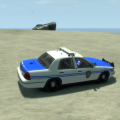
  2. this skin is based on the skin of the old NYPD Transit Police vehicles. please comment and rate :thumbsup:
    • 83 Downloads
    • 1 Comments
    Updated
    • 63 Downloads
    Submitted
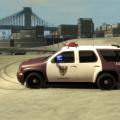
  3. just a fictonal skin of the Deventer Police Department.
    • 51 Downloads
    • 2 Comments
    Submitted
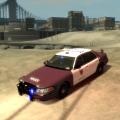
  4. my first attempt on making a skin. i still have to change the size of the badge on the side of the cars.
    • 101 Downloads
    • 3 Comments
    Updated
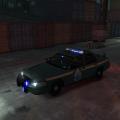
  5. this is my first attempt to make a skin. i have to change some things but it is ready to use.

    (vehicle not included)
    • 18 Downloads
    Submitted

Account

Navigation

Search

Search

Configure browser push notifications

Chrome (Android)
  1. Tap the lock icon next to the address bar.
  2. Tap Permissions → Notifications.
  3. Adjust your preference.
Chrome (Desktop)
  1. Click the padlock icon in the address bar.
  2. Select Site settings.
  3. Find Notifications and adjust your preference.