



TheDude
Members
-
Joined
-
Last visited
Files posted by TheDude
-
California Highway Patrol liveries for @PimDSLR's Ford Explorer or @Desmond98 Ford Police Interceptor Utility
by TheDude
Pack contains 8 skins which can be used for either authors model and contains Units 218-223, a K-9 and Supervisor unit.
This texture was designed to be used with PimDSLR's Ford Explorer.
OR Desmond98's Ford Police Interceptor Utility
Place any or all texture files in the police3.ytd in which you installed PimDSLR's or Desmond98's files. by default (mods)/patchday4ng/dlc.rpf/x64/levels/gta5/vehicles.rpf (or custom car slot if you plan to use it as a standalone if that's your cup of tea)
And remember to always backup!
Textures are 2048x2048
--please do not re-upload without my permission--
- 509 Downloads
- 9 Comments
Updated -
Los Santos County Sheriff liveries for F4455's 2015 charger.
0.1
by TheDude
Huge thank you to @t0p4s for letting me expand his sheriffs skins to support some vehicles that his pack does not!
All skins in my LSCS collection have unique unit numbers that do not overstep on t0p4's other files but do remain in the same district. (for realism sake) :)
This texture was designed to be used with F5544's 2015 Dodge Charger.
And make sure to check out the other skins in t0p4's LSCS liveries pack if you have not already!
Place both texture files in the police2.ytd in which you installed F5544's files by defeault (mods)/patchday4ng/dlc.rpf/x64/levels/gta5/vehicles.rpf (or custom car slot if thats your cup of tea)
And remember to always backup!
Textures are 2048x2048
==Known Bugs==
Mud/Dirt Texture does not render on rear bumper, working on a fix.
--please do not re-upload without my permission--
- 172 Downloads
- 2 Comments
Updated -
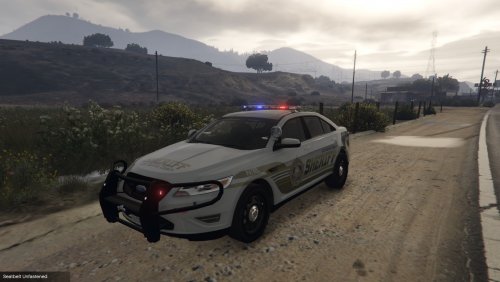
Los Santos County Sheriff liveries for PimDSLR's Ford Taurus Fed Signal Valor.
0.1
by TheDude
Huge thank you to @t0p4s for letting me expand his sheriffs skins to support some vehicles that his pack does not!
All skins in my LSCS collection have unique unit numbers that do not overstep on t0p4's other files but do remain in the same district. (for realism sake) :)
This texture was designed to be used with
PimDSLR's Ford Taurus Fed Signal Valor.
OR
POLICESCO's 2012 LSPD Ford Taurus.
And make sure to check out the other skins in t0p4's LSCS liveries pack if you have not already!
Place both texture files in the police3.ytd in which you installed PimDSLR's files by defeault (mods)/patchday4ng/dlc.rpf/x64/levels/gta5/vehicles.rpf (or custom car slot if thats your cup of tea)
And remember to always backup!
Textures are 2048x2048
Thanks to @MooHamOinkBeef21 for the updated screenshots.
==Known Bugs==
Unit numbers on roof are in wrong font, will be fixed in next release.
--please do not re-upload without my permission--
- 151 Downloads
- 1 Comments
Updated -
Model by Rockstar, Texture by TheDude.
This texture is designed to work with any black or black/white highway department skin but was designed with @Dualift HWY Patrol Skin in mind.
replace the two files in mods->x64e->models->cdimages->pedprops
This is my first upload so be kind!
- 134 Downloads
- 1 Comments
Submitted


.thumb.jpg.0a854117e18773740446ff0f7a380e52.jpg)