Skip to content
View in the app

A better way to browse. Learn more.

LCPDFR.com

A full-screen app on your home screen with push notifications, badges and more.

To install this app on iOS and iPadOS
  1. Tap the Share icon in Safari
  2. Scroll the menu and tap Add to Home Screen.
  3. Tap Add in the top-right corner.
To install this app on Android
  1. Tap the 3-dot menu (⋮) in the top-right corner of the browser.
  2. Tap Add to Home screen or Install app.
  3. Confirm by tapping Install.

ChrisMartinezV

Members
  • Joined

  • Last visited

Files posted by ChrisMartinezV

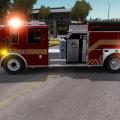
  1. This is a Firetruck texture I had made. I did not what so ever make the model, nor do I really know who made it. The model is as well in the Download area. I determined this texture from multiple real-life pictures, although the front is not exactly the same as the normal one.

    Watch the firetruck in action!:
    Part1: https://www.youtube.com/watch?v=MRPJnWToYRY
    Part2: https://www.youtube.com/watch?v=nloNXexjpNw
    • 478 Downloads
    • 3 Comments
    Updated
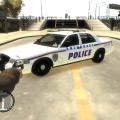
  2. This is my first skin I had made was based from just one picture ---> http://policecararchives.org/alaska/anchorage_images/cnpca18090-vi.jpg
    The model its self was made by Bxbugs123 ----> http://gtapolicemods.com/downloads.php?do=file&id=1512

    Hope you enjoyed then Skin!
    • 56 Downloads
    • 3 Comments
    Updated

Account

Navigation

Search

Search

Configure browser push notifications

Chrome (Android)
  1. Tap the lock icon next to the address bar.
  2. Tap Permissions → Notifications.
  3. Adjust your preference.
Chrome (Desktop)
  1. Click the padlock icon in the address bar.
  2. Select Site settings.
  3. Find Notifications and adjust your preference.