
Dominik335
Members
-
Joined
-
Last visited
Files posted by Dominik335
-
Auxiliary Airhorn used in polish Ambulances.
Demo:
----------------------------INSTALL----------------------------
mods/x64/audio/sfx/RESIDENT.RPF/vehicles.awc
Export to open format -> Drag & drop file to "vehicles" folder. -> Get back to OPENIV. -> Import openFormats -> Choose "vehicles" folder -> Import. -> Done.
- 122 Downloads
Updated -
----------------------------INFO----------------------------
Repaint samochodu Vauxhall Vivaro Transport Sanitarny
Repaint: Dominik335
Model: BritishGamer88
Wymagane do działania: https://www.lcpdfr.com/downloads/gta5mods/vehiclestextures/16907-btp-vauxhall-vivaro-2015/
Jeśli chcesz przerobić malowanie, śmiało 🙂
Repaint of 2015 Vauxhall Vivaro Sanitary Transport
Repaint: Dominik335
Model: BritishGamer88
Need to work: https://www.lcpdfr.com/downloads/gta5mods/vehiclestextures/16907-btp-vauxhall-vivaro-2015/
If you want to modificate the painting, go ahead 🙂
----------------------------INSTALACJA----------------------------
Instalacja za pomocą: OpenIV
Domyślnie pojazd zastępuje policet.
Nazwy plików [yourlvehicle] zmień na pojazd którego używasz jako domyślny.
Ścieżka: "Grand Theft Auto V\mods\update\x64\dlcpacks i dalej tam gdzie znajduje się ów samochód.
Jeśli masz czarne szyby, wejdź do vehicles.meta, znajdź ścieżkę diffuse tint i zmien jej wartość na:"0x00FFFFFF"
----------------------------INSTLLATION----------------------------
Installation with: OpenIV
By default, the vehicle replaces policet.
Rename the [yourlvehicle] files to the vehicle you use as default.
Path: "Grand Theft Auto V \ mods \ update \ x64 \ dlcpacks and continue to where the car is installed already.
If you have black windows, enter vehicles.meta, find car and path diffuse tint and change its value to: "0x00FFFFFF"
---------------------------Contact----------------------------
Discord: DarkAngel
E-mail: dwlodarczyk2@gmail.com
- 167 Downloads
- 1 Comments
Updated -
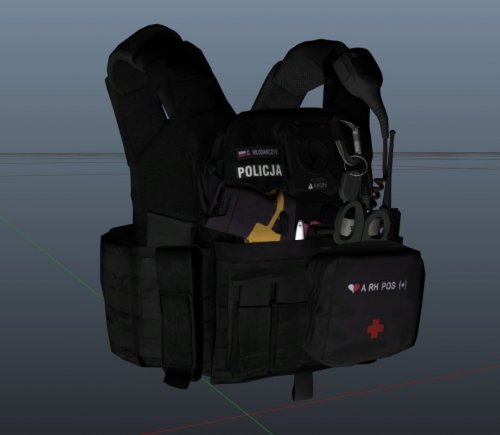
Tekstura kamizelki taktycznej dla zestawu EUP Vest- Earpice by HANAKO w schemacie Polskiej Policji.
WYMAGANA Instalacja kamizelki nr 11 z tego pakietu!
Repaint: Dominik335
Kamizelka: HANAKO
Przemalowano zestaw nr 11.
Vest from EUP Vest- Earpice by HANAKO in Polish Police scheme.
To work you need to install Vest 11 from Hanako's pack!
Repaint: Dominik335
Vest: HANAKO
For set no. 11. (vest 11)
----------------------------INSTALACJA----------------------------
Instalacja za pomocą: OpenIV
Ścieżka jeśli używasz EUP : "Grand Theft Auto V\mods\update\x64\dlcpacks\eup\dlc.rpf\x64\eup_componentpeds.rpf"
Ścieżka jeśli używasz PEUP (polskie mundury): "Grand Theft Auto V\mods\update\x64\dlcpacks\peup\dlc.rpf\x64\eup_componentpeds.rpf"
----------------------------INSTLLATION----------------------------
Install using: OpenIV
If using EUP : "Grand Theft Auto V\mods\update\x64\dlcpacks\eup\dlc.rpf\x64\eup_componentpeds.rpf"
If using PEUP (polish police uniforms): "Grand Theft Auto V\mods\update\x64\dlcpacks\peup\dlc.rpf\x64\eup_componentpeds.rpf"
- 2,191 Downloads
- 6 Comments
Updated