bixvl1
Members
-
Joined
-
Last visited
Files posted by bixvl1
-
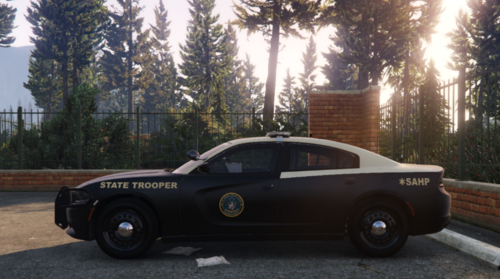
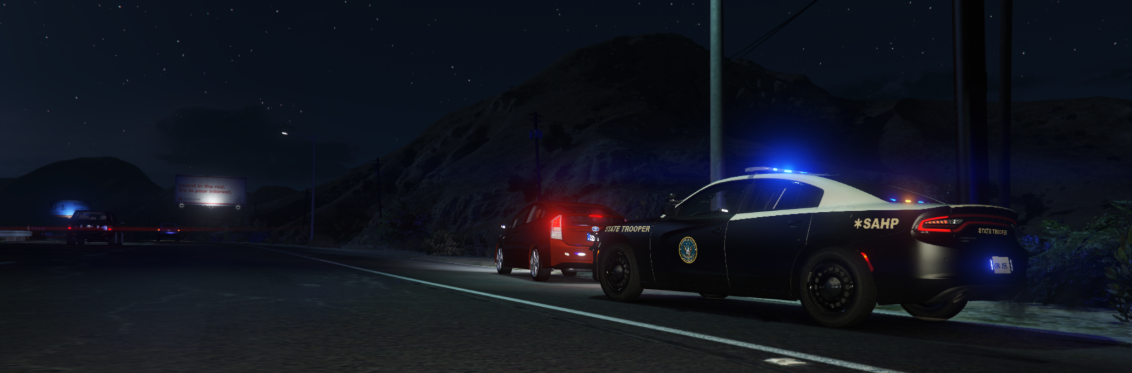
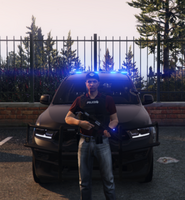
This is a Florida Highway Patrol based 2023 Dodge Charger remade to San Andreas Highway Patrol.
I DO NOT TAKE ANY RESPONSIBILITY FOR YOUR GAME FILES OR PC, MOD AT YOUR OWN RISK! MAKE SURE TO BACKUP ALL OF YOUR FILES!
YOU MUST INSTALL THIS MODEL FOR THE VEHICLE TO ACTUALLY WORK!!
Model Link: https://www.lcpdfr.com/downloads/gta5mods/vehiclemodels/49415-els-bcso-pack-addonreplace/
You're gonna go into the ''Models'' folder and then the ''Replace'' folder, choose the Charger and then choose Marked.
You're now gonna open ''OpenIV'' and go to the following path:
mods/update/x64/dlcpacks/patchday25ng/dlc.rpf/x64/levels/gta5/vehicles.rpf
Now you are gonna drag and drop the two .yft files and the two .ytd files from the ''Marked'' folder.
Now you are gonna open up the ''Texture'' folder in this download and open the ''sheriff.ytd'' inside OpenIV. Extract the ''chrg_sign_1'' from the download out onto your Desktop. Search up ''chrg_sign_1'' and select it. Then press ''Replace'' Then select the .png you just extracted and press save.
You are now gonna open up your GTA V Main Directory and open up the ''ELS'' folder, then go to the ''Pack Default'' folder. You will then open the ELS folder inside this download and drag and drop the sheriff.xml into the Pack Default folder.
Once you are done with that, you are fully done downloading the vehicle!
(The reason there is a European license plate on the car in my game is due to the fact that I have installed a mod that replaces all of the license plates to Swedish ones, this will not be within your game.)
CREDITS TO RANGERZ FOR THE MODEL AND TEMPLATE! MODEL LINK; https://www.lcpdfr.com/downloads/gta5mods/vehiclemodels/49415-els-bcso-pack-addonreplace/- 82 Downloads
- 2 Comments
Updated -
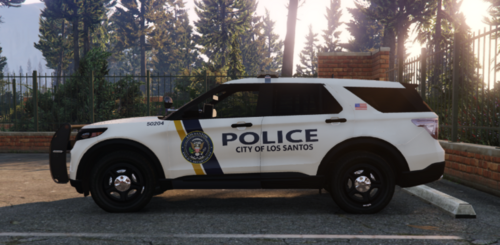
This is a Scranton Police Department based 2022 Ford Police Interceptor Unit, otherwise known as an Explorer.
I DO NOT TAKE ANY RESPONSIBILITY FOR YOUR GAME FILES OR PC, MOD AT YOUR OWN RISK! MAKE SURE TO BACKUP ALL OF YOUR FILES!
YOU MUST INSTALL THIS MODEL FOR THE VEHICLE TO ACTUALLY WORK!!
Model Link: https://www.lcpdfr.com/downloads/gta5mods/vehiclemodels/40968-ford-fpiu-2022-pittsburgh-police-2022-new-4k-template-els/
You're gonna go into the ''FPIU Pittsburgh Police'' folder
You're now gonna open ''OpenIV'' and go to the following path:
mods/update/x64/dlcpacks/patchday25ng/dlc.rpf/x64/levels/gta5/vehicles.rpf
Now you are gonna drag and drop all the Files from the Pittsburgh Folder into that folder. Now you are gonna open up the ''Texture'' folder in this download and open the ''police3.ytd'' inside OpenIV.
Extract the ''polint_sign_1'' from this download out onto your Desktop. Search up ''polint_sign_1'' and select it. Then press ''Replace'' Then select the .png you just extracted and press save.
You are now gonna open up your GTA V Main Directory and open up the ''ELS'' folder, then go to the ''Pack Default'' folder. You will then open the ELS folder inside this download and drag and drop the police3.xml
DONE!
CREDITS TO Omer77 FOR THE MODEL AND TEMPLATE! MODEL LINK;
- 44 Downloads
Updated -
This is a Kentucky State Police based 2021 Chevrolet Tahoe remade to San Andreas State Police.
I DO NOT TAKE ANY RESPONSIBILITY FOR YOUR GAME FILES OR PC, MOD AT YOUR OWN RISK! MAKE SURE TO BACKUP ALL OF YOUR FILES!
YOU MUST INSTALL THIS MODEL FOR THE VEHICLE TO ACTUALLY WORK!!
Model Link: https://www.lcpdfr.com/downloads/gta5mods/vehiclemodels/35288-els-2021-chevy-tahoe-ppv/
You're gonna go into the ''Marked'' folder and then the ''Vehicle Files'' folder in the file you just downloaded.
You're now gonna open ''OpenIV'' and go to the following path:
mods/update/x64/dlcpacks/patchday25ng/dlc.rpf/x64/levels/gta5/vehicles.rpf
Now you are gonna drag and drop all the Vehicle Files into that folder. Now you are gonna open up the ''Texture'' folder in this download and open the ''police3.ytd'' inside OpenIV. Extract the ''tahoe71_sign_1'' from the download out onto your Desktop. Search up ''tahoe71_sign_1'' and select it. Then press ''Replace'' Then select the .png you just extracted and press save.
You are now gonna open up your GTA V Main Directory and open up the ''ELS'' folder, then go to the ''Pack Default'' folder. You will then open the ELS folder inside this download and drag and drop the police3.xml.
DONE!
(The reason there is a European license plate on the car in my game is due to the fact that I have installed a mod that replaces all of the license plates to Swedish ones, this will not be within your game.)
CREDITS TO T.R.Development FOR THE MODEL AND TEMPLATE! MODEL LINK; https://www.lcpdfr.com/downloads/gta5mods/vehiclemodels/35288-els-2021-chevy-tahoe-ppv/- 51 Downloads
Updated -
This is a Hazel Park, Michigan based Dodge Durango remade to Los Santos.
I DO NOT TAKE ANY RESPONSIBILITY FOR YOUR GAME FILES OR PC, MOD AT YOUR OWN RISK! MAKE SURE TO BACKUP ALL OF YOUR FILES!
YOU MUST INSTALL THIS MODEL FOR THE VEHICLE TO ACTUALLY WORK!!
Model Link: https://www.lcpdfr.com/downloads/gta5mods/vehiclemodels/49415-els-bcso-pack-addonreplace/
You're gonna go into the ''Models'' folder and then the ''Replace'' folder, choose the Durango and then choose Marked. Then you're gonna rename the two ''sheriff2.yft'' and ''sheriff2_hi.yft'' to ''police.yft'' and ''police_hi.yft''. You will do the same with the two .ytd files.
You're now gonna open ''OpenIV'' and go to the following path:
mods/update/x64/dlcpacks/patchday25ng/dlc.rpf/x64/levels/gta5/vehicles.rpf
Now you are gonna drag and drop the two .yft files you just renamed into that folder and the two .ytd files. Now you are gonna open up the ''Texture'' folder in this download and open the ''police.ytd'' inside OpenIV. Extract the ''dur_sign_1'' from the download out onto your Desktop. Search up ''dur_sign_1'' and select it. Then press ''Replace'' Then select the .png you just extracted and press save.
You are now gonna open up your GTA V Main Directory and open up the ''ELS'' folder, then go to the ''Pack Default'' folder. You will then open the ELS folder inside this download and drag and drop the police.xml.
You're now gonna navigate to the model download again and go to the ''INSTALL THIS!!!!'' folder, then open up the ''Instructions.TXT'' file and follow what it says. Once you are done with that, you are fully done downloading the vehicle!
(The reason there is a European license plate on the car in my game is due to the fact that I have installed a mod that replaces all of the license plates to Swedish ones, this will not be within your game.)
CREDITS TO RANGERZ FOR THE MODEL AND TEMPLATE! MODEL LINK; https://www.lcpdfr.com/downloads/gta5mods/vehiclemodels/49415-els-bcso-pack-addonreplace/- 27 Downloads
Updated