Skip to content
View in the app

A better way to browse. Learn more.

LCPDFR.com

A full-screen app on your home screen with push notifications, badges and more.

To install this app on iOS and iPadOS
  1. Tap the Share icon in Safari
  2. Scroll the menu and tap Add to Home Screen.
  3. Tap Add in the top-right corner.
To install this app on Android
  1. Tap the 3-dot menu (⋮) in the top-right corner of the browser.
  2. Tap Add to Home screen or Install app.
  3. Confirm by tapping Install.

Frakee

Members
  • Joined

  • Last visited

Files posted by Frakee

  1. Textures are by Dualift edited from Vegas725
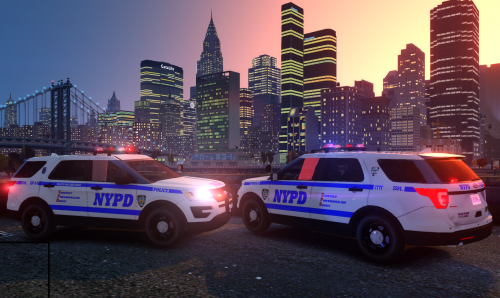
    DOWNLOAD NYPD FORD EXPLORER 2016 HERE
     
    COMES WITH CTTF, CRC , ESU, and 72PCT 
    ALSO IF EDIT THE LIGHTS TO MAKE IT MORE RED/BLUE BLOOM 
    IF YOU ONLY WANT TO INSTALL THE TEXTURES JUST COPY "fpiu_sign_1 - fpiu_sign_4" and replace them in POLICE 
    OPENIV/PC/MODELS/VEHCILES.IMG/POLICE
    PLEASE DO NOT REUPLOAD MY TEXTURES. 
     
     
    Preview 
     
    • 1,605 Downloads
    • 1 Comments
    Updated
  2. ❤️️❤️️❤️️❤️️❤️️❤️️❤️️ "LETS MAKE LCPDFR GREAT AGIN!!!! " ❤️️❤️️❤️️❤️️❤️️❤️️❤️️
     
    NOT FOR CLAN USE!!! TEXTURES (ART) IS COPYRIGHTED, NO CLAN USE!! UNLESS PERMITTED, IF SEEN, COPYRIGHT CLAIM WILL BE FILED!
    FILL FREE TO USE IT ON PATROL VIDEOS :) 
     
    NYPD ESU/COUNTER TERRORISM UNIT RELEASE DATE IS 5-3-18              
                                      

    DOWNLOAD THE AUXILIARY PACK HERE! 
     

    • 52,666 Downloads
    • 73 Comments
    Updated
  3. Textures by Dualift 
    Request by @alvine12360
    - Correct Textures 
    - Added sergeant
    IF YOU DO NOT WANT TO USE THIS AS COPS , JUST RENAME THE FILE TO WHAT YOU WANT! 


    • 2,506 Downloads
    • 7 Comments
    Updated

Account

Navigation

Search

Search

Configure browser push notifications

Chrome (Android)
  1. Tap the lock icon next to the address bar.
  2. Tap Permissions → Notifications.
  3. Adjust your preference.
Chrome (Desktop)
  1. Click the padlock icon in the address bar.
  2. Select Site settings.
  3. Find Notifications and adjust your preference.