Skip to content
View in the app

A better way to browse. Learn more.

LCPDFR.com

A full-screen app on your home screen with push notifications, badges and more.

To install this app on iOS and iPadOS
  1. Tap the Share icon in Safari
  2. Scroll the menu and tap Add to Home Screen.
  3. Tap Add in the top-right corner.
To install this app on Android
  1. Tap the 3-dot menu (⋮) in the top-right corner of the browser.
  2. Tap Add to Home screen or Install app.
  3. Confirm by tapping Install.

Player1 development

Members
  • Joined

  • Last visited

Files posted by Player1 development

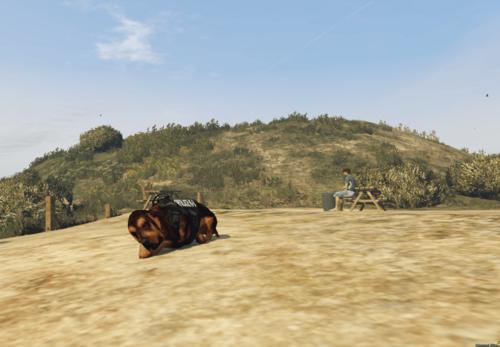
  1. How to install on FiveM:
    Drag and drop in your Resource folder and ensure dalmatian in your server.cfg
    or for more info you can read this https://forum.cfx.re/t/how-to-stream-add-on-peds/5638

    Model:https://sketchfab.com/3d-models/bloodhund-from-cotw-game-ears-has-animglitch-351b67e15041482abe19e45ccfed1412

    How to install on SinglePlayer:
    Enter the path in Openiv
    mods\x64e.rpf\models\cdimages\streamedpeds_a_c.rpf\a_c_shepherd Replace files:
    Head
    mods\x64e.rpf\models\cdimages\streamedpeds_a_c.rpf Replace files
    a_c_shepherd.yft a_c_shepherd.ymt

    and will work have fun

    If you would like to appreciate my work or see my paid mods, you can find them here:https://www.patreon.com/c/_Player1_
    • 123 Downloads
    • 3 Comments
    Updated

Account

Navigation

Search

Search

Configure browser push notifications

Chrome (Android)
  1. Tap the lock icon next to the address bar.
  2. Tap Permissions → Notifications.
  3. Adjust your preference.
Chrome (Desktop)
  1. Click the padlock icon in the address bar.
  2. Select Site settings.
  3. Find Notifications and adjust your preference.