Skip to content
View in the app

A better way to browse. Learn more.

LCPDFR.com

A full-screen app on your home screen with push notifications, badges and more.

To install this app on iOS and iPadOS
  1. Tap the Share icon in Safari
  2. Scroll the menu and tap Add to Home Screen.
  3. Tap Add in the top-right corner.
To install this app on Android
  1. Tap the 3-dot menu (⋮) in the top-right corner of the browser.
  2. Tap Add to Home screen or Install app.
  3. Confirm by tapping Install.

patrickm28

Members
  • Joined

  • Last visited

Files posted by patrickm28

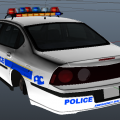
  1. This skin is an OCPD skin for the CHEVROLET IMPALA / IMP1-V4.3V ELS-H by Lt. Caine.

    This file includes the skin, and ELS files for the model.
    • 26 Downloads
    • 1 Comments
    Submitted
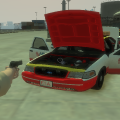
  2. A FlyUS security CVPI for Francis International Airport.


    The texture is intended for use with the FORD CROWN VICTORIA / CVPI-V4.6A ELS-H By Lt. Caine. The raw .png file has been included so this texture can be used on any compatible CVPI.

    Created Using Paint.NET & The Template Included With Lt. Caine's Download.


    To use the Orange Lights, you must edit the "emerlights" & "emerlights_emis" files in the .wtd (NOT INCLUDED). A tutorial can easily be found with a simple google search.
    • 209 Downloads
    • 2 Comments
    Updated

Account

Navigation

Search

Search

Configure browser push notifications

Chrome (Android)
  1. Tap the lock icon next to the address bar.
  2. Tap Permissions → Notifications.
  3. Adjust your preference.
Chrome (Desktop)
  1. Click the padlock icon in the address bar.
  2. Select Site settings.
  3. Find Notifications and adjust your preference.