


Argelert
Members
-
Joined
-
Last visited
Everything posted by Argelert
-
.thumb.png.73211d2e599bd5747e51bb06f0d6bd78.png) Cheers mate, just waiting on getting verified so I can try out this sick skin pack
Cheers mate, just waiting on getting verified so I can try out this sick skin pack -
Would you be able to put links to these vehicles because I am having a hard time finding them.
-
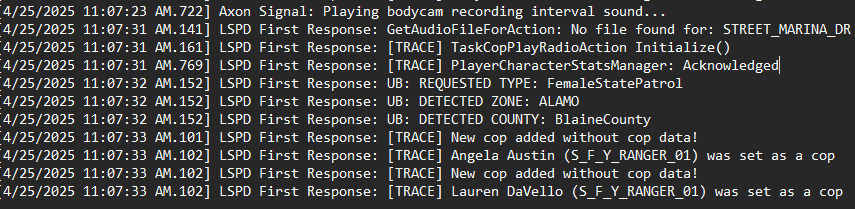
As the title details everytime I go to respond to a call or request backup, the game will suddenly crash, I have taken a look at my logs and receive a New cop added without cop data! message RagePluginHook.log
-
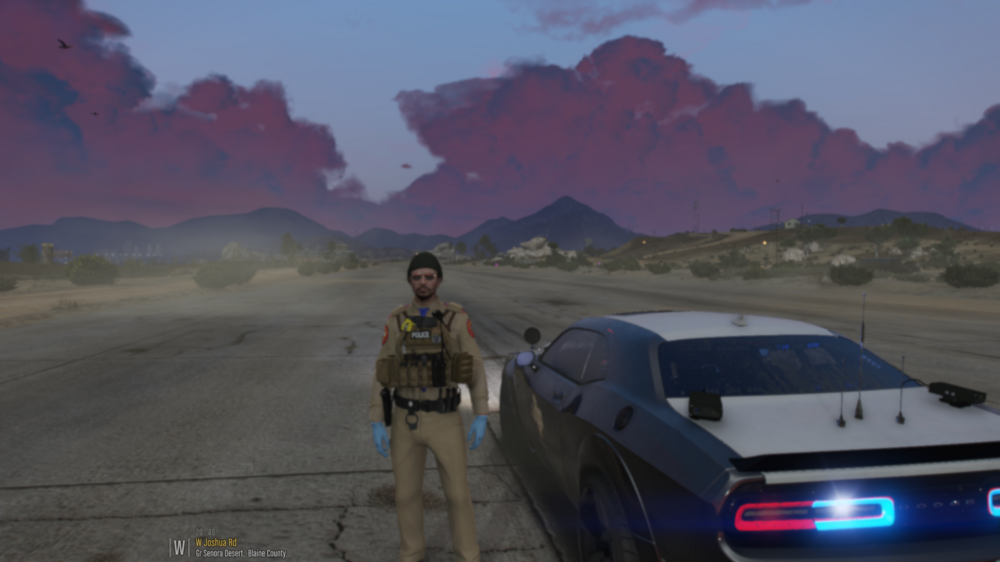
I recently downloaded a couple graphics mods which are Realistic Weather effects and QuantV for which I installed according to the instructions and ever since I have been experiencing these blurry sort-of graphics. Did I miss something in terms of settings or instructions?
-
Alright, is there possibly a list or article that would have a list of mods that are supported or ones that aren't that way I can identify which ones to avoid in the case that I do have them installed. Obviously it's some mod(s) that could be causing this indefinitely.
-
I have those downloaded prior to the issues occurring to make my game run smoother, it's just that after the new LSPDFR/RPH/ScriptHookV update is when these issues started occurring. Basically nothing has changed except the upgrade for the 3 tools and me downloading the ScriptHook Nightly, everything else (mods, scripts, plugins, and etc.) has remained the exact same.
-
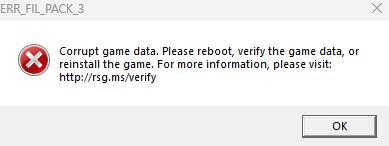
I have re-downloaded all my mods from scratch and now when I go to load up RPH with it named "mods" it has the error that is in the screenshot attached to this message and once hitting ok, the game automatically closes and brings up RPH crash report. I have also attached my most recent RPH log. RagePluginHook.log
-
I tried the well-known approach which is to name it to _mods where the game loaded but with no mods. What is interesting is that the game ran fine with the same set of mods prior to the update, all of a sudden after the update, the game would no longer get past the load story mode with RPH part.
-
The part that doesn't make sense to me is after I updated for the latest lspdfr, RPH, and ScriptHookV is when it started causing issues. It would work fine prior to me updating and no changes were made to the mods folder after updating.
-
I have also identified that removing my mods folder is able to launch the game, obviously I just wouldn't have any mods which would be pointless. I have attached the version of logs if I remove the mods folder. RagePluginHook.log
-
Every time I start GTA V with Rage Plugin Hook, it loads to the main screen where I then hit Story mode with RPH and it goes through loading with the messages such as populating and then crashes. I have also tried downloading ScriptHook nightly which has also been of no use. RagePluginHook.log
-
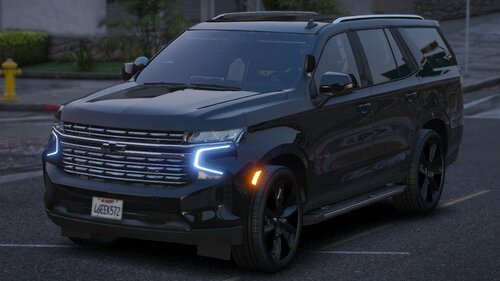 Just wanted to be able to remove the stock dark tint as the only Meta File in the folder is for handling (which works like a charm btw). If I could be able to change the tint so that the rear windshield lightbar could be visible, otherwise a great looking vehicle.

.thumb.png.73211d2e599bd5747e51bb06f0d6bd78.png)



