Skip to content
View in the app

A better way to browse. Learn more.

LCPDFR.com

A full-screen app on your home screen with push notifications, badges and more.

To install this app on iOS and iPadOS
  1. Tap the Share icon in Safari
  2. Scroll the menu and tap Add to Home Screen.
  3. Tap Add in the top-right corner.
To install this app on Android
  1. Tap the 3-dot menu (⋮) in the top-right corner of the browser.
  2. Tap Add to Home screen or Install app.
  3. Confirm by tapping Install.

LikelyGoodCreations

Members
  • Joined

  • Last visited

Files posted by LikelyGoodCreations

  1. I figured a lot of people could use this, I don't post much, BUT I am proud to present.

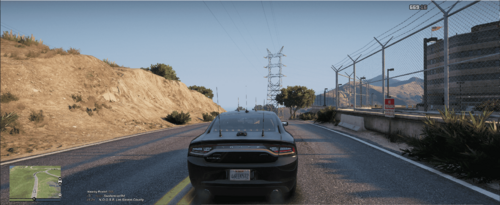
    A WORKING MOD TO FIX GAMEPLAY ON 32:9!!!!

    This mod is brand new, only has 1 fix, it's the most annoying, more to come.

    I have messed with the games original code and have managed to fix:
    - Mini-Map in the middle of the screen is now at the left as it is supposed to be.
     
      Install Instructions  
    1. Once OpenIV is openned, open the following path:
        a. GTAV -> mods -> update -> update.rpf -> common -> data -> ui
    2. Activate "Edit Mode" by clicking the bar on the top right, and confirming.
    3. Drag the "frontend.xml" file from the .rar into the path, it will replace the current frontend file.
     
    You are REQUIRED to have OpenIV

    Blue and Pink Modern Gradient Tech Conference Video (1).mp4
    • 156 Downloads
    • 7 Comments

Account

Navigation

Search

Search

Configure browser push notifications

Chrome (Android)
  1. Tap the lock icon next to the address bar.
  2. Tap Permissions → Notifications.
  3. Adjust your preference.
Chrome (Desktop)
  1. Click the padlock icon in the address bar.
  2. Select Site settings.
  3. Find Notifications and adjust your preference.