Dr.Mamba
Members
-
Joined
-
Last visited
Files posted by Dr.Mamba
-
🔗 Join Our Discord
🚨 TACSIMS Callouts — Alpha Release
Created by: Dr. Mamba & Maminka
📦 Overview
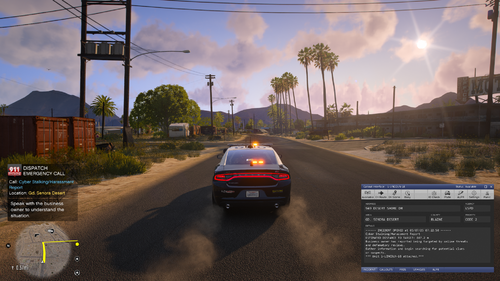
Welcome to the TACSIMS Callout Pack – an immersive, realism-based set of 25 callouts designed to bring grounded police work to LSPDFR. This is the alpha version, and all current callouts are centered around the Sandy Shores region. Our focus is believable NPC behavior, natural dialogue, and dynamic scene variety.
✅ Features
🔸 25 unique callouts across various incident types
🔸 All callouts fully support Callout Interface API
🔸 Balanced mix of Code 2 and Code 3 responses
🔸 Dialogue-heavy scenarios for realism and immersion
🔸 Dynamic outcomes, suspect behavior, and response logic
🔸 Clean end logic and blip management
🔸 Built with modular expansion in mind
📍 Current Callouts (Alpha)
Animal Cruelty – Abandoned Dog
Cyber Stalking / Harassment
Family Dispute
Hit and Run
Kidnapping Reported
Probation Violation
Underage Alcohol Sale
Insurance Fraud – Staged Crash
Elderly Missing
Abandoning Child in Vehicle
Road Rage Incident
Vehicle Fire
Homeless Harassment
Trespassing
Misuse of Emergency Services
Seen Wanted Suspect
Fake Police Officer
Porch Pirate Theft (Disabled for time being)
Serving Subpoena
Back-Up Traffic Stop
No Alcohol License
Backup for Suspicious Vehicle/Vendor
Runaway Plane
Stolen Plane at LSIA
Domestic Caller Misuse
Bar Fight
InterstatePursuit (NEW)
Solicitation inspired by Albo(BETA)
📥 Installation
Download the .zip and extract the contents
Place the TACSIMS Casual Callouts(.dll) and related files in:
Grand Theft Auto V/Plugins/LSPDFR/
Make sure Callout Interface API is installed
Launch the game and you're good to go!
🧪 We're Actively Looking for Beta Testers!
We’d love your feedback and gameplay reports to help improve the pack before public beta. Join our Discord to:
Get early access to new locations
Help shape future updates
Suggest callout ideas
Get direct dev support
👉 Join our Discord
🔮 Coming Soon
🔹 Major location expansions beyond Sandy
🔹 Dialogue overhauls with branching outcomes
🔹 AI backup logic and EMS/FD interaction
🔹 Full agency-specific variants (LSPD, BCSO, etc.)
🔹New Callout!
Thank you for supporting realism in GTA V roleplay.
~ Dr. Mamba & Maminka
- 53,133 Downloads
- 71 Comments
Updated -
📢 Active Shooter Callout Pack v2.0.0 | Developed by TACSIMS
📬 Join Our Discord:
Stay updated, report bugs, and suggest new callouts:
https://discord.gg/k7u4qXme8j
🚨 Overview:
The Active Shooter Callout Pack brings high-risk critical incidents to LSPDFR, focusing on realism, urgency, and immersive scene handling.
Developed by TACSIMS, this pack challenges players to secure areas, neutralize threats, and manage civilians across multiple environments.
Version 2.0.0 expands the experience with new locations, improved stability, and smarter AI behaviors.
✨ Features:
✅ Workplace Active Shooter Scenario
✅ Theater Active Shooter Scenario
✅ Street/Parking Lot Active Shooter Scenario
✅ NEW: University Campus Active Shooter Scenario (v2.0.0)
✅ Smarter suspect and civilian AI reactions
✅ Optimized stability and cleanup to prevent crashes
📜 Changelog:
Version 2.0.0 (April 28, 2025):
Added New Location: Active Shooter at University
Major Stability Improvements:
Optimized suspect and civilian AI behavior
Improved entity cleanup after callouts
Reduced rare crash and freeze issues
Performance Enhancements:
Smoother callout startup and ending sequences
Branding Update:
Rebranded from Tech Op Studios to TACSIMS
Version 1.0.0 (Initial Release):
Released original callouts:
Workplace Active Shooter
Theater Active Shooter
Street/Parking Lot Active Shooter
🛠️ Requirements:
LSPDFR 0.4.9 or newer
Open All Interiors v5.1 or newer (REQUIRED) (Any Open Interiors Mod Works)
Callout Interface API
Open All Interiors is required for proper access to all indoor locations featured in the callouts.
📥 Installation Instructions:
Drag and drop the .dll file and any related folders into your GTA V/plugins/lspdfr directory.
Ensure all required plugins listed above are installed and working.
Launch GTA V and go on duty in LSPDFR — dispatch will send you active shooter incidents dynamically.
🧹 Tips for Best Gameplay Experience:
Respond Code 3 with urgency.
Some scenes may have multiple suspects or civilians in danger.
Use Open All Interiors to access theaters, workplaces, and the new university location.
Always backup your GTA V installation before installing new plugins.
🏆 Credits:
Developed by TACSIMS
Special thanks to our early access testers for improving this release!
🚓 Stay sharp. Stay safe.
See you on patrol, officer.
- 16,722 Downloads
- 25 Comments
Updated -
Introducing Real Reactions — the first plugin by Dr.Mamba
This is version 1.0 and the beginning of a long-term realism project designed to enhance the feel of combat in GTA V. Real Reactions introduces subtle but immersive NPC behavior: peds stumble, drop weapons, and react to injuries based on where they're hit. Whether it's an arm shot or a taser hit, expect responses that bring the world to life without being over-the-top.
This is the initial release, so there may be minor bugs or edge cases. Feedback is appreciated as the plugin evolves.
Installation is simple — just drop the .dll into your scripts folder. The INI file is generated automatically on first run, giving you full control over reaction intensity and behavior.
Requires ScriptHookVDotNet 3 and .NET Framework 4.8.
Join the community Discord to report bugs, get help, suggest features, and follow future updates:
https://discord.gg/WwfSrxT2vT
- 4,784 Downloads
- 15 Comments
Updated