
TheDexter
Members
-
Joined
-
Last visited
Files posted by TheDexter
-
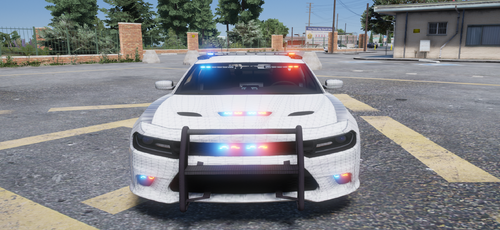
My first try to rebrand Dodge as Bravado, there is definitely still issues and this is an early version. You can report here any bugs that are not mentioned here.
Because this is an early version, there is no laptop, devider or any other police stuff inside the vehicle. That will be added in future updates. (maybe) The light pattern is working but will be updated in the future.
Most of the stuff has been added.
The vehicle is unlocked so you can edit it. Do not reupload as your own.
Vehicle is right now locked.
Known bugs -
Weird dirt map
No engine ( Bonnet doesn't open )
The lights moves really far away when you hit front and back bumper from bottom.
The lightbar glass turn black when tint applied
- 1,198 Downloads
- 6 Comments
Updated -
My second try to rebrand Dodge as Bravado, there is definitely still issues and this is an early version. You can report here any bugs that are not mentioned here.
The vehicle is locked . Do not reupload as your own.
I suggest to set tint to "stock", the lightbar glass is more clear with that.
Known bugs -
When tint applied the lightbar goes dark
Plate is not working (idk why)
- 1,385 Downloads
- 4 Comments
Updated