
Charged Hose Graphics
Members
-
Joined
-
Last visited
Files posted by Charged Hose Graphics
-
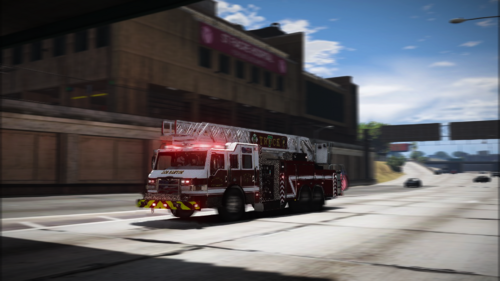
These are custom Liveries made by myself. I was going for a generic/realistic looking fleet to add to my LSPDFR/FiveM and figured I would share them with everyone else. Hope you enjoy!
Leave recommendations for more liveries in the comments and stay up to date on my account and see if your recommendation made it.\
Ripple's Pierce Velocity Engine: https://ripplesvehicledev.com/products/pierce-velocity-engine
Ripple's 2019 Battalion Chief Silverado: https://ripplesvehicledev.com/products/2019-battalion-chief-silverado
JackTheDev's 2015 Pierce Velocity Ladder Truck:
- 137 Downloads
- 1 Comments
Updated -
These are a few custom logos I've made for my LSPDFR and FiveM. I'll be actively updating this file over time with blank liveries for firetrucks, ambulances and sprint cars. Recommend station logos in the comments and I will try my best to make them as accurate as I can.
- 655 Downloads
- 3 Comments