dav123
Members
-
Joined
-
Last visited
Everything posted by dav123
-
I tried but it doesn't work. I think it's a mod problem because by deactivating the mods folder the game started normally
-
-
rage plugin hook when loading story mode it crashes and generates a crash report file. RagePluginHook.log
-
I changed but the game continues to crash after 10 minutes of play, generating a crash report file RagePluginHook.log
-
-
now when I go to service lspdfr crashes
-
by changing the name of the mods folder the game starts and opens but while I go to service the lcpdfr plugin freezes. With the mods folder active the game doesn't even start. These file are with the mods folder activated RagePluginHook.log
-
when I'm in the loading screen and load the story with ragepluginhook the game crashes sending me an error message "the game has crashed" RagePluginHook.log
-
Because when I go to openiv and try to add files to have modded machines I get an error message: the file does not exist. I also tried dragging the modded files to the destination with the mod edit but they don't add. I run Openiv as an administrator
-
this problem is solved. Now it crashes after playing for a while
-
when I go to service LCPDFR crashes lspdfr crash.txt RagePluginHook.log
-
doesn't work
-
-
L'ho provato e non funziona
-
RagePluginHook.log
-
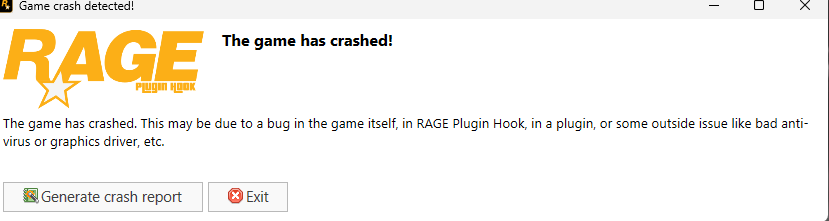
The first problem has been resolved. Now when I open the game it freezes and crashes while loading the rageplugin hook story sending me this message
-
RagePluginHook.log
-
After that, it freezes and crashes
-
When I try to start RagePluginHook I get this error message. This is my log. What can I do? RagePluginHook_23122023_215336.log