




Echoo
Members
-
Joined
-
Last visited
Files posted by Echoo
-
HolsterPlus enhances server immersion by introducing realistic holstering behavior with visible weapon handling, animations, and synchronized sound effects. Weapons are properly managed between holstered and drawn states, ensuring the player’s equipped weapon is visually and functionally consistent with their actions.
The script includes configurable animations for both holstering and unholstering, along with audio feedback to reinforce transitions. It also supports visual weapon placement by removing the weapon from the player when holstered and restoring it when drawn, improving overall realism.
Installation is fast and straightforward, allowing the resource to be fully operational within minutes. No advanced setup or technical knowledge is required, making it suitable for servers of any size seeking improved immersion with minimal overhead.
Preview
https://www.youtube.com/watch?v=HfrQOFWaf0I
Looking for more?
Join the EchooProjects.dev Discord for updates, support, and additional releases. -
Third-eye a fire truck door, and your ped is ready for firefighting. Features:
Configurable vehicle list with advanced door selection
Fire-resistant ped when SCBA and Turnout are equipped
Toggle Turnout Gear on/off
Toggle SCBA Gear (requires Turnout to be active)
Integrates with ox_target and mythic_notify
Optimized for performance
https://www.youtube.com/watch?v=TsExRqDE7OE&t=2s
-
DRIVEX
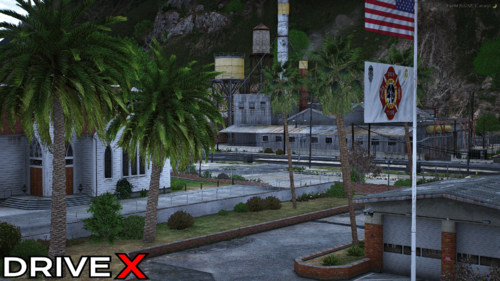
What is DriveX?
DriveX is a FiveM modification designed to enhance the
game’s driving experience by expanding and improving the surrounding scenery.
It adds new details and activity to the world, making the environment feel more vibrant and alive as you drive.
Will it ever be SP?
A single-player version will not be released until the final stages of development.
This may change without notice.
Occasionally a test build or limited SP release may appear.
Updates and support for SP versions are not guaranteed.
Why does it look like SenoraExitRemastered in Sandy?
DriveX includes an updated version of SenoraExitRemastered.
This serves as a foundation for its content.
Additional features and improvements are being added.
More updates are planned for the future.
How often does it update?
DriveX receives frequent content updates,
adding new vegetation, props, and other enhancements.
Updates are released daily to weekly,
ensuring the world continues to evolve and feel more immersive.
echooprojects.dev
Quality Productions, established in 2025. Dedicated to bringing immersive and polished content to the community.- 635 Downloads
- 4 Comments
Updated -
Advanced Loading Screen is a modern and feature-rich FiveM loading screen designed to enhance your server’s first impression. It combines immersive visuals, background music, and smooth UI interactions to deliver a polished and professional player experience from the moment they connect.
Features
Custom background images
Integrated music playback
Clean, modern interface
Optimized for performance
Easy to configure and customize
Preview
https://www.youtube.com/watch?v=-Tv3luMuRwI
Documentation
https://docs.echooprojects.dev/documentation/fivemscripts/advancedloading
Looking for more?
Join the EchooProjects.dev Discord for updates, support, and additional releases: -
SPEEDY CALLOUTS
"Built by the community, not developers."
Built on FivePD v1.5.2
Who is Echoo?
He is a small developer, working on many things from ymaps to car liverys. All work produced is presented with high qaulity images and work. All work is produced through time, hard work, and effort. Constantly developing behind the scenes. Follow to see more work!
What is this?
This is a FivePD callout pack designed for the FiveM modification FivePD, a police simulator. It introduces a variety of exciting callouts, including drunk driver pursuits, regular vehicle pursuits, stolen ambulances, and stolen police vehicles. More callouts are on the way, expanding the gameplay experience even further.
Why choose this?
These callouts feature high-speed, realistic drivers, replacing dull 20mph chases with thrilling, reckless pursuits. Drivers behave unpredictably, adding more excitement and fun for the community. Step up your FivePD experience with dynamic, adrenaline-filled callouts!
-
ECHOO'S WORKSHOP
Quality Productions, established in 2025. Dedicated to bringing immersive and polished content to the community.
(Preview Video Above)
I started this project back in early August just for fun, but after working on it I realized a lot of people might actually enjoy this map. So I decided to release it to the public. I’ll be posting more maps like this here, and some will be shared privately in my Discord (link below).
We’re also looking for developers and staff to help with ymaps and to keep the Discord running. If you’re interested, just open a ticket in the Discord and we can talk more.
One quick thing I want to mention — if you check my profile, you’ll see I have warnings from my past for using other people’s content. I want to be real about it: I messed up, I learned from it, and I won’t be doing that again. It’s disrespectful to creators and the community, and I regret it. I hope that doesn’t give you the wrong impression about me or my projects going forward.
Thanks for checking out the description, hope you have a great day!
- 409 Downloads
Updated
.thumb.png.518295974aa895bfeaa61d4f68351c15.png)


.thumb.png.54bc0b55f9cdd2779a13b5e172bf8e78.png)
.thumb.jpg.7013d05ea6a10bada5e6baf86e6ca9d1.jpg)
