FlameOptics
Members
-
Joined
-
Last visited
Files posted by FlameOptics
-
Unleash an unparalleled auditory experience with my FiveM Sound Pack – a meticulously crafted enhancement that brings your game to life. Designed with precision for FiveM servers, this pack is packed with features that redefine immersion and realism.
Features:
Ballistic Sounds: Feel the power behind every shot! Our pack delivers high-definition ballistic sound effects that amplify the intensity of every firefight.
Siren Sounds: Fully reworked sirens with crisp, dynamic tones that ensure every chase feels cinematic and adrenaline-pumping.
Gun Sounds & Reloading: Experience re-engineered gun sounds and detailed reloading audio. Each firearm boasts unique sound profiles for maximum authenticity.
Key Highlights:
FiveM-Ready: Seamlessly integrate this pack into your FiveM experience for instant upgrades. No additional setup needed!
High-Quality Audio: Created with cutting-edge technology to provide clean, distortion-free sounds.
Realism Redefined: Every sound effect has been expertly balanced to deliver a lifelike audio experience that keeps players engaged.
Take your FiveM experience to the next level with this sound pack – a must-have for anyone aiming to enhance realism and player satisfaction. Whether you're patrolling the streets or engaging in high-stakes action, this pack guarantees an auditory experience like no other.
Try it now and hear the difference!
- 981 Downloads
- 4 Comments
Updated -
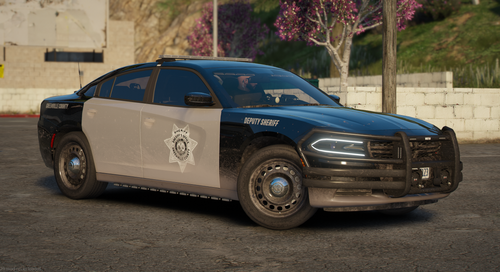
Hi, This is a 2018 charger livery based on the Greenville County Sheriff's Office in South Carolina.
Soon I will be releasing a full pack based on this county, What cars would you guys like to see in the pack?
I have also attached a picture of the Real Paint Scheme for the sheriffs office for reference.
- 64 Downloads
- 3 Comments
Updated -
Description:
Want more realistic sounds for your game. You've found the right mod!
Installation:
- Navigate to your GTA files, more specifically the sfx directory.
- Should be somewhere around D:/Steam/steamapps/common/Grand Theft Auto V/x64/audio/sfx
- Find your current WEAPONSPLAYER.rpf file.
- If you want to keep your current WEAPONSPLAYER.rpf, rename it to "WEAPONSPLAYER.ORIGINAL.rpf" or something similar then drag it on to your desktop or somewhere else. Just get it out of the sfx directory.
- If you want to overwrite it and delete it, just drag and drop the WEAPONSPLAYER.rpf file you just downloaded into the directory.
WHEN RENAMING THE FILE, IT WILL AUTOMATICALLY ADD .RPF. IF YOU ADD IT YOURSELF, IT WILL NOT WORK AS YOU ESSENTIALLY JUST RENAMED THE FILE TO WEAPONSPLAYER.rpf.rpf
- Open your game and shoot a gun to test the sounds.
Credits:
Fire Sirens: By JJ
Police Siren Clips: From Modern Siren Pack
Gun Sounds: Custom
- 8,644 Downloads
- 9 Comments
Updated