Skip to content
View in the app

A better way to browse. Learn more.

LCPDFR.com

A full-screen app on your home screen with push notifications, badges and more.

To install this app on iOS and iPadOS
  1. Tap the Share icon in Safari
  2. Scroll the menu and tap Add to Home Screen.
  3. Tap Add in the top-right corner.
To install this app on Android
  1. Tap the 3-dot menu (⋮) in the top-right corner of the browser.
  2. Tap Add to Home screen or Install app.
  3. Confirm by tapping Install.

NFYNYTE Developement

Members
  • Joined

  • Last visited

Files posted by NFYNYTE Developement

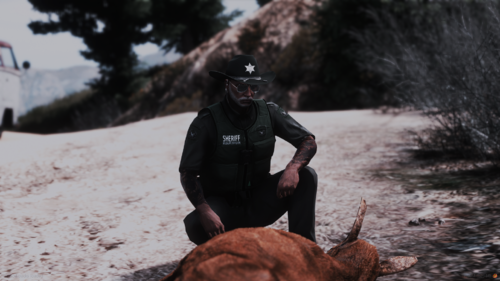
  1. Dive into the rugged wilderness of San Andreas with our Game Warden EUP Pack, featuring a versatile range of Class A, B, and C uniforms in a distinctive single variant. Choose your style with business or cargo pants, complemented by unique T-shirts and polo shirts. Top it off with customizable cowboy hats or baseball caps. Stay prepared and professional with slim traffic vests equipped with body cameras, and adapt to changing conditions with our exclusive weather jackets in a single variant. Elevate your law enforcement experience with this comprehensive pack designed for the San Andreas Game Warden in you!


    Discord: discord.gg/BA6mTKSGcR
    • 510 Downloads
    • 3 Comments

Account

Navigation

Search

Search

Configure browser push notifications

Chrome (Android)
  1. Tap the lock icon next to the address bar.
  2. Tap Permissions → Notifications.
  3. Adjust your preference.
Chrome (Desktop)
  1. Click the padlock icon in the address bar.
  2. Select Site settings.
  3. Find Notifications and adjust your preference.