pinx
Members
-
Joined
-
Last visited
Everything posted by pinx
-
-
 Yes, that completely passed me by lol. I didn't pay much attention to this as it's not a "final" version. Thanks for the feedback.
- 91 comments
- 12 reviews
-
-
Pinx Callouts is a set of callouts being developed by me. I decided to released a very premature version to collect opinions, information and requests. As it is the alpha version, it is normal that there will be bugs, it is just a version to collect opinion for improvement from the public. Requirements: - Stop The Ped. Installation: Drop the “plugins” folder into your GTA directory. Note: If you have version 1.0.2 installed, you can remove the file: "INIFileParser.dll" (if any other mode depends on it, then do not remove it). !!! NOTE FOR FEMALE CHARACTERS !!! I will soon release an update for those who use female characters. Currently the police officer's voice is only male. Bug Report && Suggestions Form: Bug reports and suggestions will now be via Google Forms for better management. Want to make a suggestion or report a bug? If so, fill out this short Google Form: https://forms.gle/UNTUGExkomRYwN767 ALPHA Features: - 600+ Different random spawn positions for certain Callouts. - Different behaviors in each callout. A callout can have a different story direction (Aggressive or Passive) - AI Voices - Frequent updates. ALPHA Version Callouts: - Illegal Racing - Drug Trafficking (AI Voice) - Public Protest - Drunk Person (AI Voice) - Illicit Interception - Suicide Bomber - Vandalism - Hostage Situation - Suicide By Cop - Stolen Luxury Vehicle - Two Groups Fighting - People Attacking a Bus - Unknow Call - Agressive Bulldozer - Citizen Arrest (AI Voice) - Requested Air Support (AI Voice) - Van Shooters - Traffic Stop Backup (AI Voice) - Money Truck Robbery - Traffic Fight (AI Voice) - Human Trafficking (AI Voice) - Illegal Dogfighting (AI Voice) - Gang Shootout - Illegal Car Meet - Illegal Biker Convoy (AI Voice) - Money Truck Escort (AI Voice) - Psychopathic Person (AI Voice) - Police Impersonation (AI Voice) Upcoming Callouts: - Jewelry Store Robbery - PSPD (Pacific Standard Public Deposit Bank) Assault About the Project The Pinx Callouts project was created with the main objective of complementing LSPDFR with realistic Callouts. One of the goals of this project is to reach +100 Callouts. The second objective of this project is to bring callouts that players wanted to see in the game, that is, to make this desire to see them in the real game. It is currently still in a draft version, but each day it is supplemented more. IMPORTANT: Please report any bugs you find. If possible, take a screenshot of the console (F4). Any suggestions for improvement, or anything you would like to see in a callout, don't hesitate to say so.
- 91 comments
- 12 reviews
-
-

-

-

-

- 26
-
-
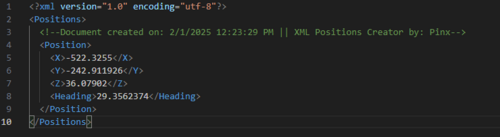 Recently I needed to get a lot of positions on the map, and I thought it would be a very boring job. So I made a script that automatically creates an XML file with the Player's position(and also the heading). You can save as many positions as needed. The good thing about XML is that we can use all the positions directly from the file. Useful for creating callouts 🙂 For you to better orient yourself, already saved positions will appear as a blip on the map. I'll leave it here for public use. I hope I helped and saved you a lot of time. Installation: Place the "XML Positions Creator.dll" in "GTADirectory/Plugins", and that's it. How to use: When you are in the position you want to save, click on "0" (Zero) and it will be saved. IMPORTANT: The XML file will be saved in "GTADirectory/Plugins/XPCreator". ⚠️⚠️⚠️Any bugs or suggestions, feel free to say. it's my first mod for gta lmao
 -
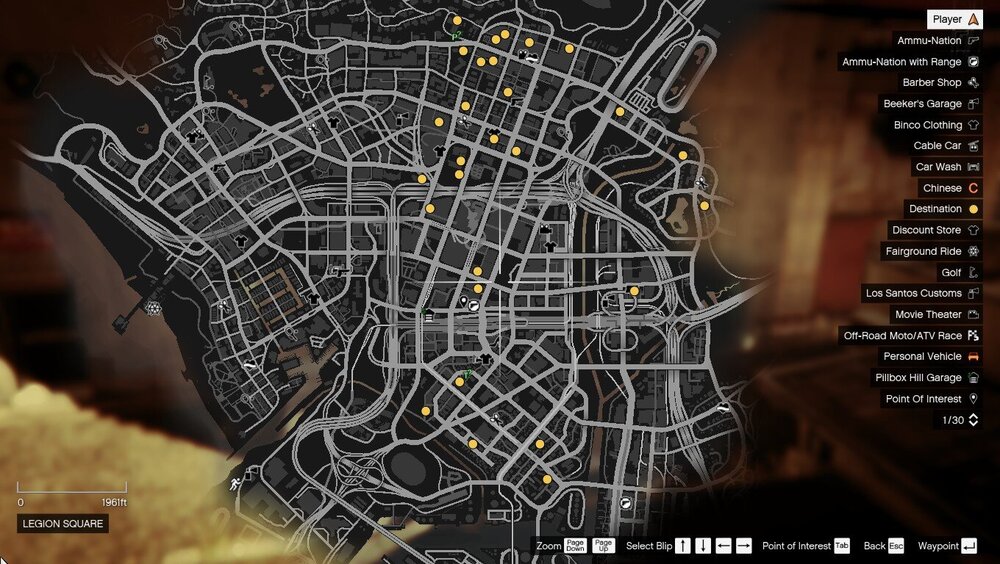
UPDATE: - Now all created and saved positions will be shown on the map in blip form for better guidance when creating new positions. EXAMPLE:
-
Recently I needed to get a lot of positions on the map, and I thought it would be a very boring job. So I made a script that automatically creates an XML file with the Player's position(and also the heading). You can save as many positions as needed. The good thing about XML is that we can use all the positions directly from the file. Useful for creating callouts 🙂 I'll leave it here for public use. I hope I helped and saved you a lot of time. Installation: Place the "XML Positions Creator.dll" in "GTADirectory/Plugins", and that's it. How to use: When you are in the position you want to save, click on "0" (Zero) and it will be saved. IMPORTANT: The XML file will be saved in "GTADirectory/Plugins/XPCreator". Any bugs or suggestions, feel free to say 🙂 it's my first mod for gta lmao