Fabianstudios
Members
-
Joined
-
Last visited
Files posted by Fabianstudios
-
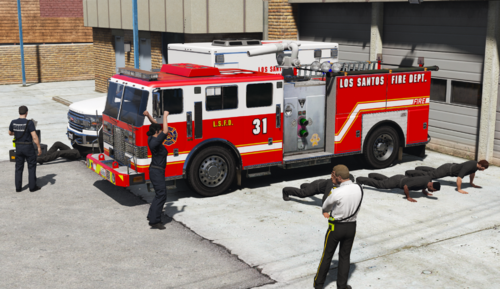
This is an Exteter Township-inspired LSFD pack including variety of units - from Engines up to Rescue trucks. Each vehicle comes with a single livery, except AIF's engine (it has 3 livery variations).
Please find the vehicles I've used below:
AIFs Engine: https://www.lcpdfr.com/downloads/gta5mods/vehiclemodels/46409-lore-project-5-emergency-lsfd-task-force-pack/
AIFs Ladder: https://www.lcpdfr.com/downloads/gta5mods/vehiclemodels/48467-lore-fdlc-mtl-aistro-rear-mount-ladder-truck/
AIFs Rescue: https://www.lcpdfr.com/downloads/gta5mods/vehiclemodels/30850-lore-project-5-emergency-mtl-usar-heavy-rescue/
Monkey's Engine: https://www.gta5-mods.com/vehicles/mtl-fire-truck-improved-model-add-on-liveries-template
Monkey's Rescue: https://www.gta5-mods.com/vehicles/brute-fire-rescue-truck-add-on-liveries-template
Rumpo Ambulance: https://www.gta5-mods.com/vehicles/medical-response-san-andreas-mrsa-pack
Sandstorm Ambulance: https://www.gta5-mods.com/vehicles/vapid-sandstorm-ambulance-add-on-tuning-liveries-lods
Sandstorm Brushtruck: https://www.gta5-mods.com/vehicles/sandstorm-d205-brush-truck-4x4-6x6-add-on-sounds
2020 Scout: https://www.gta5-mods.com/vehicles/scout-2020-medical-response-mrsa-eagl-add-on-sounds
Download instructions:
In order to install textures, you just have to replace the livery files (eg. stanier_sign_1 for staniers) with ones provided in OpenIV. Some compression types may cause lines to appear pixelated, so it's best to play around and see what works best for you.
Use this video if you need any further help: https://www.youtube.com/watch?v=ojLmRr8PErI
Feel free to use my liveries for FiveM or modify them to your liking, but DO NOT PUT THEM OR USE THEM FOR CONTENT BEHIND PAYWALL.
V1.0 - Release
- 135 Downloads
Updated -
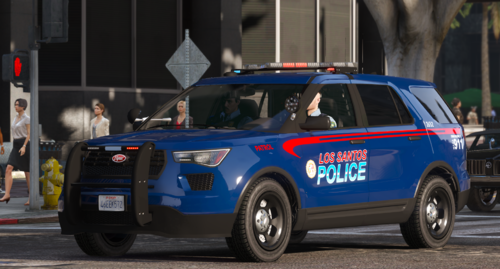
This is Atlanta-inspired LSPD livery pack for 6 different lore vehicles - Stanier, Torrence, Scout (2012, 2016, 2020) & Buffalo STX. This pack is merely my artistic interpretation for some liveries, so it isn't 100% accurate to IRL APD liveries. I made sure that each vehicle has different divisions and callsigns available, in order to add replayability to the pack.
Please find links to vehicles I've used below:
https://www.gta5-mods.com/vehicles/lspd-lssd-pack
https://www.gta5-mods.com/vehicles/vapid-scout-patrol-emergency-services-pack
https://www.gta5-mods.com/vehicles/lspd-k9-los-santos-police-department-k-9-platoon-pack
https://www.gta5-mods.com/vehicles/2020-vapid-police-cruiser-utility
https://www.gta5-mods.com/vehicles/bravado-buffalo-sx-stock-buffalo-stx-add-on-lore-friendly-police
In order to install textures, you just have to replace the livery files (eg. stanier_sign_1 for staniers) with ones provided in OpenIV. Some compression types may cause lines to appear pixelated, so it's best to play around and see what works best for you.
Please also note, that this pack uses transparent liveries - in order to use them you'll have to edit carvariations.meta in OpenIV for each vehicle (color ID I used is 62). If you need any further help, please use this video (https://www.youtube.com/watch?v=RhmbKe3ZEGU).
Feel free to use my liveries for FiveM or modify them to your liking, but DO NOT PUT THEM OR USE THEM FOR CONTENT BEHIND PAYWALL.
- 75 Downloads
- 1 Comments
Updated