




Z33HD
Members
-
Joined
-
Last visited
Everything posted by Z33HD
-
I found it and deleted it, I tried running the game again and still the same issue.
-
I installed the updated versions of script hook v, rph, and lspdfr due to the new gta v update. When I launch the game im stuck on a black screen for around two to four seconds and then GTA V closes. How do I fix that?
-
My dlcpack lines are not showing up in the dlc list. The game still has the mods loaded in but one mod is causing a crash (5real). I checked my dlc list after installing 5 real and all my lines for my mods were there. After experiencing some crashes I decided to remove the mods from my dlc list but not a single of the lines for my mods are showing up. The dlc list only has the lines that are there on a fresh download of GTAV. What should I do?
-
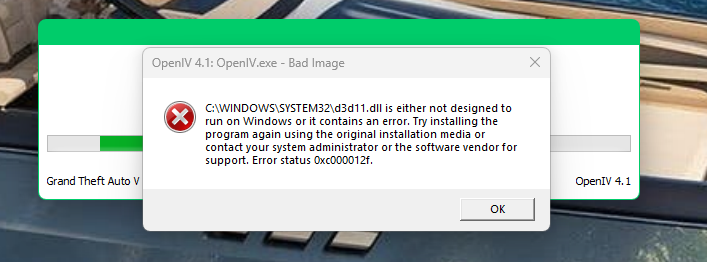
OpenIV never gave me problems before up until today. After I launch OpenIV and click windows it instantly says bad image along with an error code: 0xc000012f. I have to remove an item from my dlclist so I can launch LSPDFR without any problems but this one error is preventing me from even getting into OpenIV. I reinstalled OpenIV and my C++ redistributables but still no luck. Im on windows 11 with the latest updates if that helps. Any ideas on how to fix this issue?
-
I am running it on the default map, Im not using any graphic mods or anything that changes the map.
-
asiloader.logScriptHookV.log @UnknownBastion Here ya go boss! Also what do I do about my callouts? Whenever I force a callout or when one comes up randomly it will instantly clear the callout and say code 4.
-
@UnknownBastion Well that seemed to do the trick but now my script hook v keeps crashing. I will use menyoo to pick an outfit I had saved, and then when I switch to a second outfit I get an error saying "CORE: There was an error executing menyoo.asi id 45" and sometimes it says id 44. Not sure which log you need to see for that so just let me know and I will upload it.
-
I was just in an open space with nothing above me.
-
LSPDFR plugin will crash mid game for no reason, is anyone else having this problem or know how to fix it? RagePluginHook.log here is my log too.
-
I have Ultimate Backup installed. I haven't installed any new mods. Ultimate Backup was working fine up until today. Whenever I would try to spawn in a K9 Partner, instead of spawning next to me like it usually used to do, it would fall from the sky and die when it would hit the pavement next to me. I do a lot of K9 gameplay so this is a bit of an issue for me. Any ideas on how to fix this?
-
The rage plugin keeps getting stuck on "launching game". I've tried different settings, verifying my game files, reinstalling the entire game, getting the most recent version of rage from their official website, and even launching the game first then launching rage but each time it gets stuck on "launching game". What should I do? I watched this video a few weeks ago and it worked perfectly fine up until yesterday. I play the game through Epic Games if that helps!

